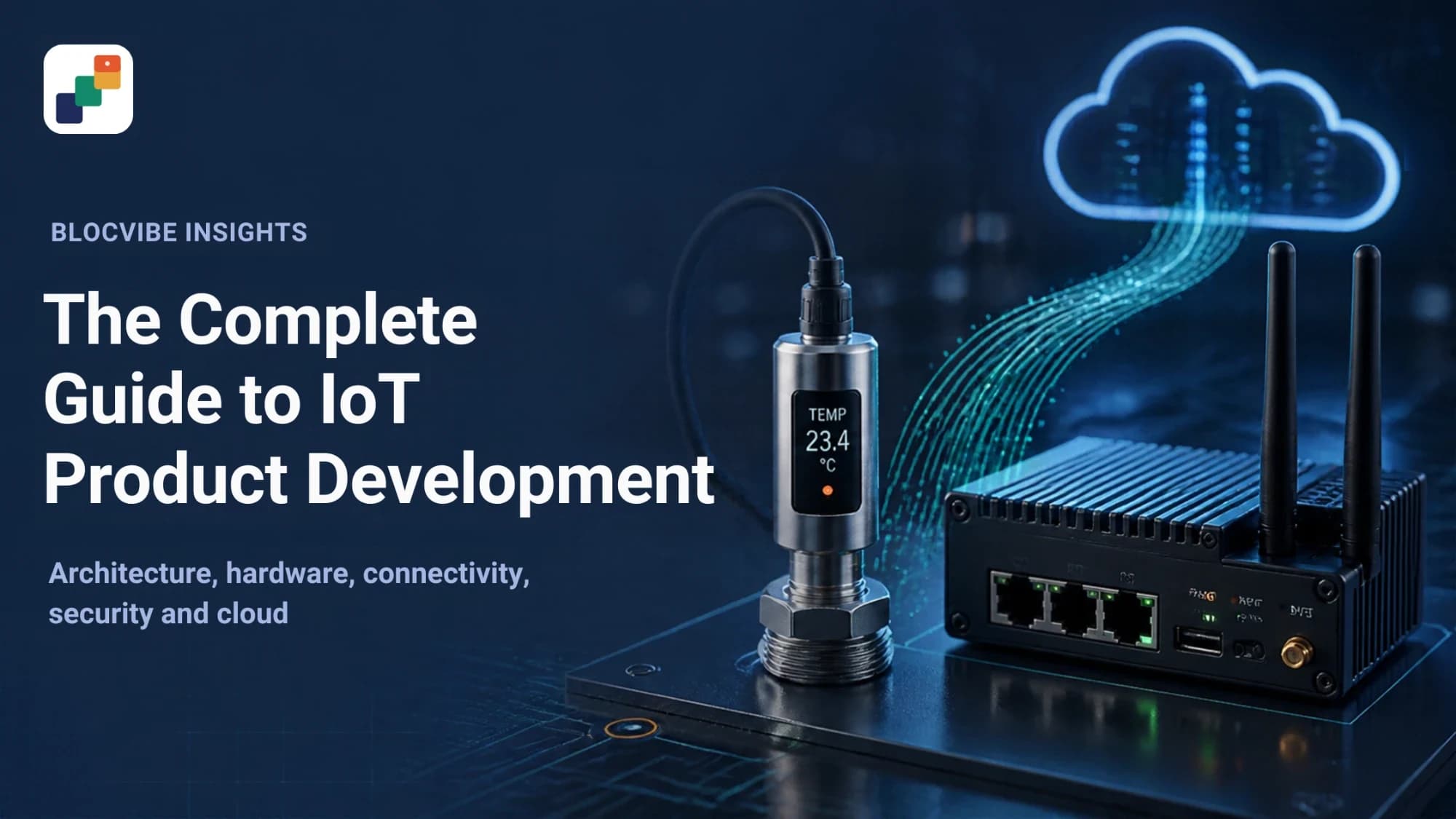
A temperature sensor costs very little. A connected product that reads that sensor reliably for years, sends the data securely over an unreliable network, stores it, raises the right alert at the right moment, shows it clearly on a phone, and can be updated safely in the field is a different matter entirely. That gap is what IoT product development is about.
This guide explains, in plain English, how a physical device becomes a connected, intelligent product: the hardware, the software inside the device, the network, the cloud, the database, the apps people use, and the security that has to run through all of it. It is written for business owners, founders and product managers who need to make good decisions about an IoT product without being engineers themselves.
What is IoT product development?
The Internet of Things (IoT) describes physical objects that collect information about the world, or act on it, and exchange that information over a network. A connected thermostat, a vibration sensor on a factory motor, a soil-moisture probe in a field and a GPS tracker in a delivery van are all IoT devices.
An ordinary object becomes "connected" when three things are added: sensors that measure something (temperature, movement, location, light, pressure), a small computer that reads those measurements and decides what to do with them, and a communication link that sends the information to software where people can see it and act on it.
Businesses use IoT to:
- Monitor equipment and spot problems before a breakdown, as in industrial machine monitoring.
- Improve operations, for example by tracking stock, fleets or energy use in real time.
- Offer smarter products, such as smart home devices that customers control from an app.
- Make decisions from data rather than guesswork: when to irrigate, when to service, where energy is wasted.
Other familiar examples include smart agriculture (soil and weather sensors), healthcare monitoring devices (which also carry strict medical regulations), connected vehicles, and smart energy meters.
IoT product development is more than building an electronic device. It combines electronics, embedded software, networking, cloud software, databases, web and mobile apps, security and manufacturing, and all of them have to work together for years. Most failed IoT products did not fail because of one bad component, but because the pieces were designed separately.
How does an IoT product actually work?
Follow a single temperature reading from a machine to a manager's phone:
- A sensor detects something. A temperature sensor on a motor produces an electrical signal that represents the temperature.
- A microcontroller reads it. A small computer inside the device converts that signal into a number, such as 71.8 °C.
- Firmware processes it. The device's built-in software checks the reading makes sense, perhaps averages several readings, and decides whether and when to send it.
- The device communicates. It sends the reading over a network such as Wi-Fi, cellular, LoRaWAN or a cable.
- A gateway or protocol transfers it. Either the device talks to the internet directly, or a local gateway collects messages from nearby devices and forwards them, often using a messaging protocol called MQTT.
- A cloud platform receives it. Servers in a data centre accept the message and route it to the right service.
- Backend services validate and process it. They check the message is genuine and well-formed, apply business rules, and decide whether an alert is needed.
- A database stores it. The reading joins the device's history, so trends can be seen later.
- APIs make it available. Applications request the data through secure, structured interfaces.
- A web or mobile app shows it. The manager sees the live value, a chart of the last 24 hours, and any alerts.
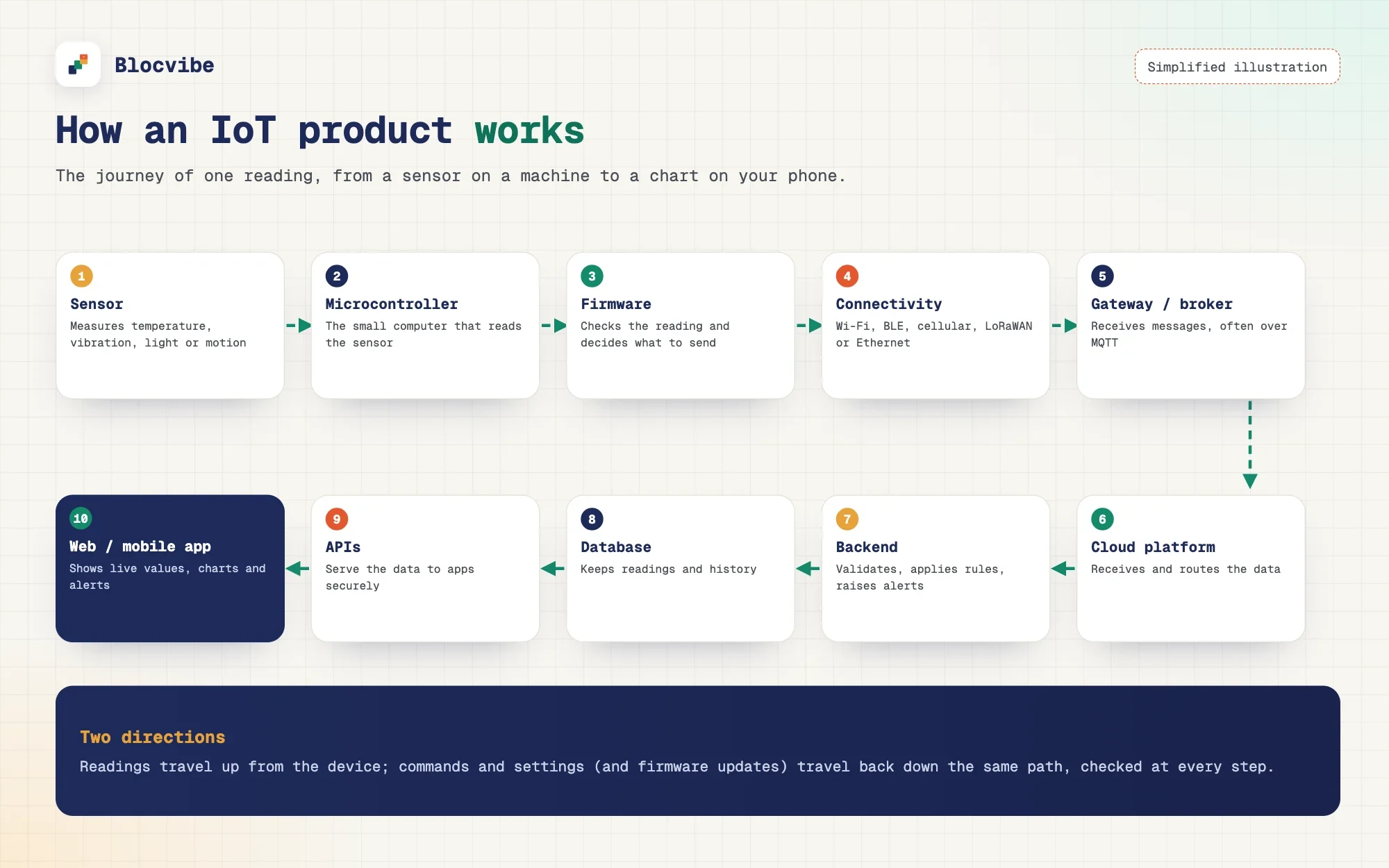
Information also travels the other way. When a user changes a setting or switches a pump off in the app, that command passes back through the API, the backend, the messaging layer and the network to the device, where the firmware acts on it. Firmware updates follow the same route. Every one of those steps must be checked and secured.
The IoT product development lifecycle
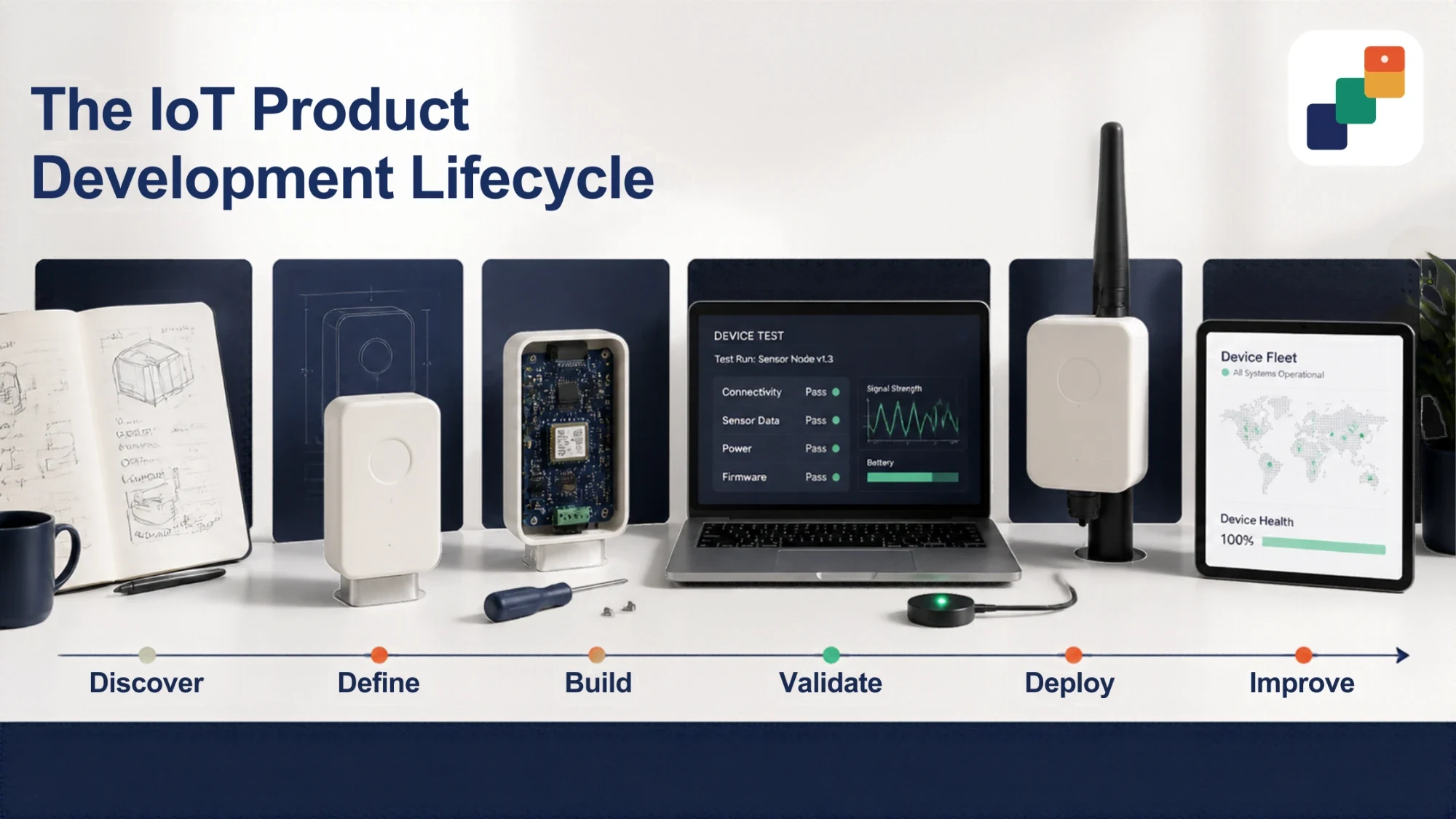
An IoT product is developed in stages. Each stage reduces risk before the next, more expensive, one begins. The ten stages below describe what engineers do and what the business receives at each point.
Stage 1: Idea validation and requirement analysis
Before any hardware is chosen, the team works out exactly what problem the product solves and for whom.
- The business problem: what costs money or time today, and how a connected product would change it.
- Users: who installs it, who uses the app, who maintains it.
- Functional requirements: what it must measure, how often, and what it must do with the result.
- Technical requirements: battery life, data frequency, response time, how many devices.
- Environment: indoors or outdoors, temperature range, dust and water, vibration, mobile signal, power availability.
- Build or buy: whether an existing device and platform would do the job, which is often cheaper.
- A roadmap from proof of concept to production.
What the business receives: a requirements document, a decision on whether to build, and a roadmap. Validating the idea first is the cheapest way to avoid an expensive product nobody needs; our guide to validating an idea before writing code covers the methods.
Stage 2: Hardware architecture and component selection
Hardware choices shape cost, reliability, battery life and how easy the product is to manufacture and support.
- Microcontroller or microprocessor: a microcontroller is a small, low-power computer on one chip, ideal for simple, battery-powered devices. A microprocessor runs a full operating system such as Linux, suited to gateways and devices that need more computing power.
- Sensors and actuators: sensors measure; actuators act, such as relays, valves and motors. Accuracy, range and cost vary widely.
- PCB design: the printed circuit board connects every component. Its layout affects radio performance, interference, heat and cost.
- Power management and batteries: how the device is powered, how long a battery must last, and how the device sleeps between readings.
- Communication modules: Wi-Fi, Bluetooth, cellular or LoRaWAN radios, and their certification.
- Memory and storage: enough to store firmware, two copies for safe updates, and readings while offline.
- Enclosure: the case, its protection against dust and water, mounting and heat.
- Component availability: parts must remain available for the product's whole life; shortages can halt production.
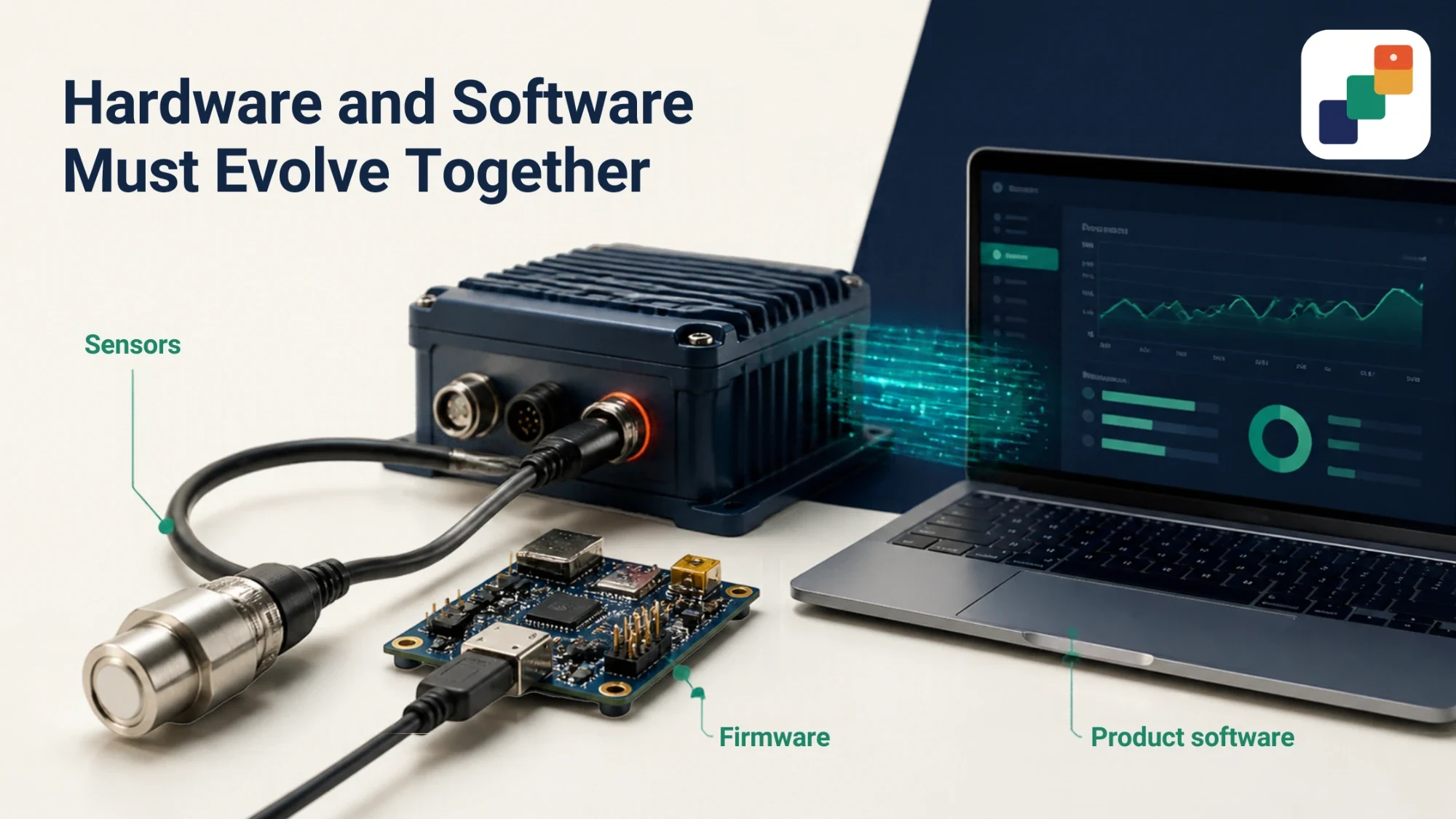
What the business receives: a hardware architecture, a bill of materials with costs, and early prototypes. A cheaper component that halves battery life, or a radio that struggles inside a metal cabinet, can cost far more later than it saves now.
Stage 3: Firmware development
Firmware is the software that lives inside the device and controls its hardware. Unlike a website or mobile app, it runs on a tiny computer with very little memory and power, often for years without a restart, and it must keep working even when something unexpected happens.
- Reading sensors: using the device's interfaces (such as I2C, SPI or analogue inputs) to take measurements.
- Controlling components: switching relays, driving motors, lighting status LEDs.
- Configuration: storing settings such as how often to send readings.
- Communication: connecting to the network, sending messages and receiving commands.
- Error handling: retrying failed connections, storing readings while offline, recovering from crashes with a watchdog that restarts a stuck device.
- Firmware updates: installing new versions safely, with a fallback if an update fails.
- Secure boot and integrity: at start-up, the device checks that its firmware is genuine and unmodified before running it.
Many devices run a small real-time operating system (RTOS), such as FreeRTOS or Zephyr, which helps firmware handle several tasks at once with predictable timing. What the business receives: working firmware, a tested update process and documentation.
Stage 4: Connectivity and communication protocols
Connectivity is how the device reaches the rest of the system. There is no single best option; the right one depends on range, power, data volume, cost and where the device lives.
| Technology | Range | Power use | Data rate | Typically suits |
|---|---|---|---|---|
| Wi-Fi | Building scale | Higher | High | Mains-powered devices where Wi-Fi exists |
| Bluetooth Low Energy (BLE) | Room scale | Very low | Low to moderate | Wearables, setup from a phone, short-range sensors |
| Cellular (such as LTE-M and NB-IoT) | Wide area | Moderate to low | Low to high | Vehicles, remote sites, devices without local networks |
| LoRaWAN | Long range (kilometres) | Very low | Very low | Small, infrequent readings from battery devices: agriculture, utilities |
| Ethernet | Cabled | Mains | High | Fixed industrial equipment, gateways |
| Zigbee | Short range mesh | Low | Low | Smart home and building devices |
On top of the network, devices and servers agree a protocol: the language and rules for their messages.
| Protocol | How it works, simply | Typically suits |
|---|---|---|
| MQTT | Devices publish small messages to a central broker, which delivers them to subscribers | Most device-to-cloud telemetry and commands |
| HTTP / HTTPS | Request and response, as used by websites and APIs | Occasional uploads, configuration, app-to-backend APIs |
| WebSockets | A two-way connection kept open between browser and server | Live dashboards that update instantly |
| CoAP | A lightweight request-response protocol designed for constrained devices | Very small, low-power devices and networks |
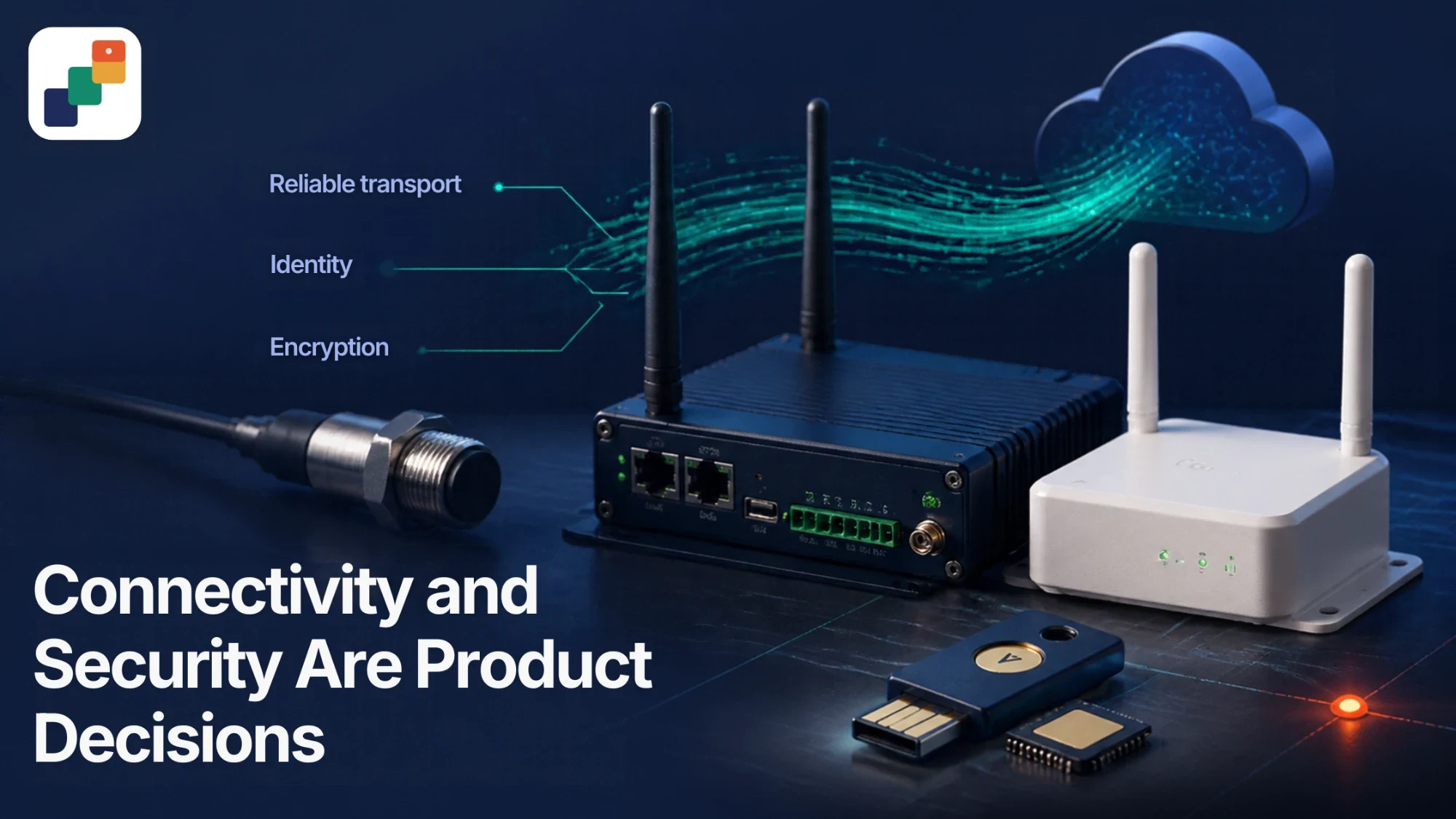
Five factors drive the choice: bandwidth (how much data), latency (how fast it must arrive), power (battery or mains), range, and reliability in the real environment, such as inside steel buildings or rural areas with weak signal.
Stage 5: IoT gateway and edge computing
A gateway is a local device that collects data from nearby devices and forwards it to the cloud. Many small devices cannot reach the internet themselves: BLE and Zigbee devices need a local hub, and industrial machines often speak older protocols such as Modbus that the cloud does not understand.
Gateways handle protocol conversion (translating local protocols into MQTT or HTTPS), local processing, data filtering (sending only what matters), and offline operation (storing data when the internet connection drops and sending it later).
Edge computing means processing data close to where it is created rather than sending everything to a distant cloud. Edge processing is preferable when decisions must be instant (such as stopping a machine), when bandwidth is expensive or limited, when connectivity is unreliable, or when raw data should not leave the site for privacy reasons.
Industrial example: a vibration sensor can produce thousands of samples per second. Sending all of them to the cloud would be costly and unnecessary. A gateway on the factory floor analyses the vibration locally and sends a summary every minute, plus an immediate alert if the pattern changes, while keeping data safely during network outages.
Stage 6: Cloud architecture and backend development
The cloud side is the product's central nervous system. It includes:
- Device registration and identity: each device is recorded with a unique identity, usually a certificate or key created during manufacturing.
- Device authentication: every connection proves it really is that device.
- Device management: knowing which devices exist, where they are, which firmware they run, and whether they are healthy.
- Data ingestion and message brokers: receiving large numbers of messages reliably; an MQTT broker or message queue absorbs bursts so nothing is lost.
- Backend services and APIs: applying business rules, storing data and providing secure interfaces for apps.
- Real-time processing: checking readings against thresholds as they arrive.
- Notifications: email, SMS and push alerts to the right people.
- Monitoring and logging: tracking the health of the whole platform, not just the devices.
Major cloud providers offer managed IoT services for device identity and messaging, which can shorten development; others build on open-source brokers and their own backend. The choice depends on scale, cost, data location and the team's expertise.
Stage 7: Database architecture and data management
An IoT product needs to remember two very different kinds of information:
- Records: devices, sites, users, which user owns which device, settings, alert rules. These are relationships, which suit a relational database such as PostgreSQL or MySQL.
- Readings: a continuous stream of timestamped measurements from every device. These are time-series data, which grow quickly and are queried by time range. They suit a time-series database, or a time-series extension to a relational database.
Good data management also covers retention (how long raw readings are kept), aggregation (keeping hourly or daily summaries once raw data expires), indexing so charts load quickly, and backups and recovery. A thousand devices sending a reading every minute produce more than 1.4 million readings a day, so these decisions directly affect cost and speed.
Stage 8: Web and mobile application development
For most users, the app is the product. It typically includes:
- Sign-in and user roles, such as owner, technician and viewer.
- Device registration and pairing, often by scanning a QR code or connecting over Bluetooth during setup.
- Dashboards with real-time values, historical charts and alerts.
- Device controls and settings, sent back to the device through the backend.
- Responsive web design for desktops and tablets, and mobile apps for people on the move.
The app never talks to devices or the database directly. It calls the backend's APIs over HTTPS; the backend checks permissions, reads the database or sends commands through the messaging layer, and returns the result. That separation is what keeps the system secure and maintainable.
Stage 9: Testing, prototyping and quality assurance
- Proof of concept (PoC): a rough build that proves the core idea works at all, such as whether the sensor can detect the fault.
- Minimum viable product (MVP): the smallest complete version that real users can rely on.
- Hardware testing: power, heat, radio performance and durability.
- Firmware testing: logic, edge cases, recovery from failures and updates.
- Integration and API testing: the device, cloud and app working together correctly.
- Connectivity testing: weak signal, dropped connections and reconnection.
- Load testing: thousands of simulated devices sending data at once.
- Environmental testing: temperature, humidity, dust, water and vibration.
- Security testing: device, network, cloud and app, ideally by independent testers.
- Battery testing: measured, not estimated, battery life.
- Field testing and user acceptance: real devices, real sites, real users.
Lab results are not enough: devices must be tested in the conditions they will face, such as a cold warehouse, a dusty factory or a basement with poor signal, before large numbers are built.
Stage 10: Deployment, manufacturing and maintenance
- Pilot deployment: a small number of devices at real sites, to learn before scaling.
- Manufacturing preparation and production testing: every unit is tested on the production line.
- Device provisioning: giving each device its unique identity and credentials securely during manufacturing or setup.
- Installation: clear instructions and tools for installers.
- Cloud deployment: the backend running in production with monitoring and backups.
- Over-the-air (OTA) updates: delivering signed firmware updates remotely, in stages, with the ability to roll back.
- Monitoring and support: spotting offline or failing devices and helping customers.
- Security patches and lifecycle management: fixing vulnerabilities for the product's supported life, and planning its eventual retirement.
Launching an IoT product is the start of its life, not the end of development. Devices in the field need monitoring, updates and support for years.
IoT application architecture: the complete technical structure
Seen as a whole, an IoT product is a stack of layers, each with one job.
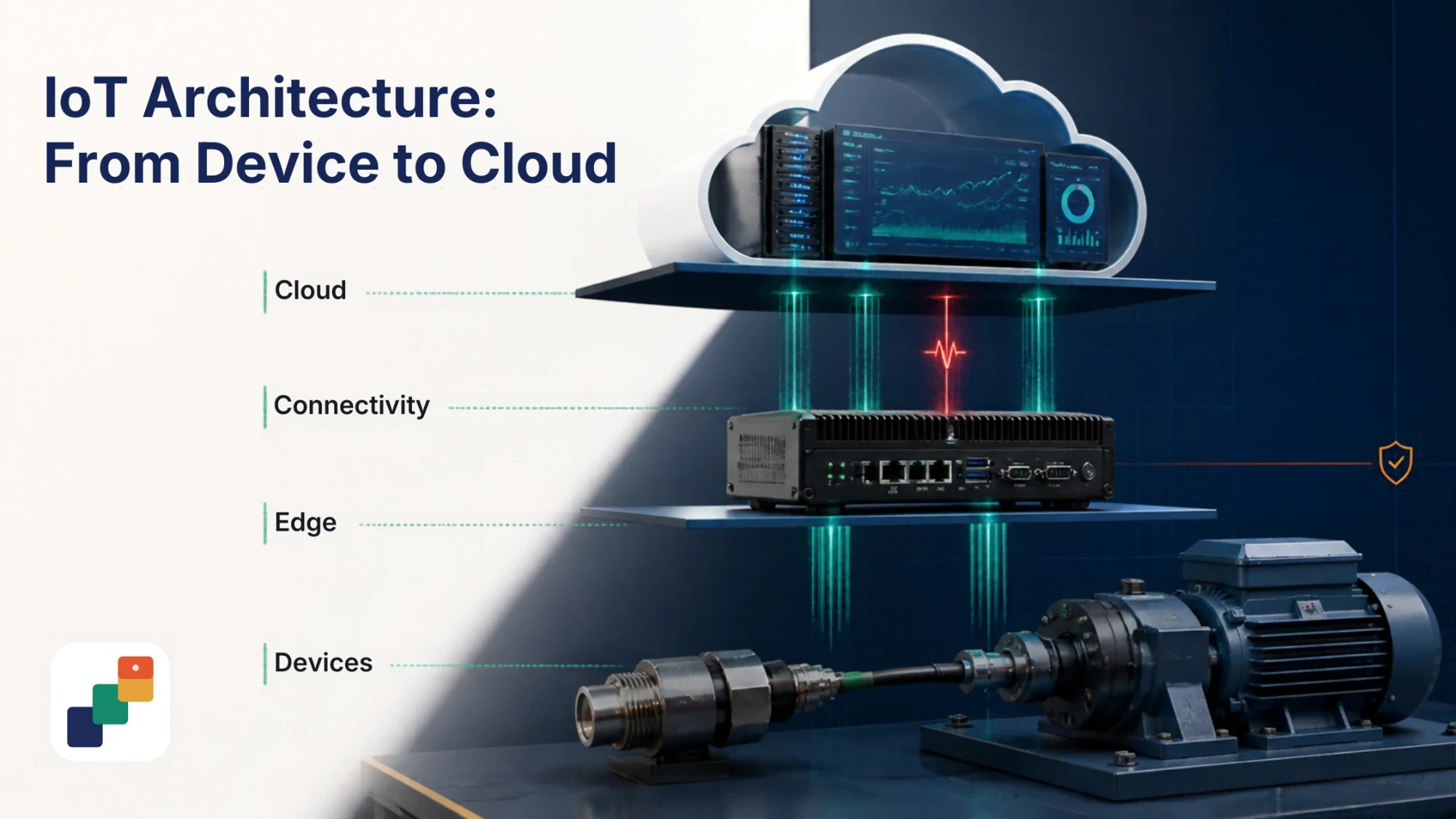
- Device layer: sensors, actuators, microcontrollers and embedded hardware.
- Firmware layer: the device's operating logic, sensor processing and communication.
- Connectivity layer: Wi-Fi, BLE, cellular, LoRaWAN and other networks.
- Gateway and edge layer: local processing, protocol translation and offline operation.
- Messaging layer: MQTT brokers and message queues that move messages reliably.
- Cloud and backend layer: APIs, business logic, device management and processing.
- Database layer: device records, readings, history and users.
- Application layer: dashboards, mobile apps, reports and notifications.
- Security and monitoring layer: authentication, authorisation, encryption, logs and monitoring across every other layer.
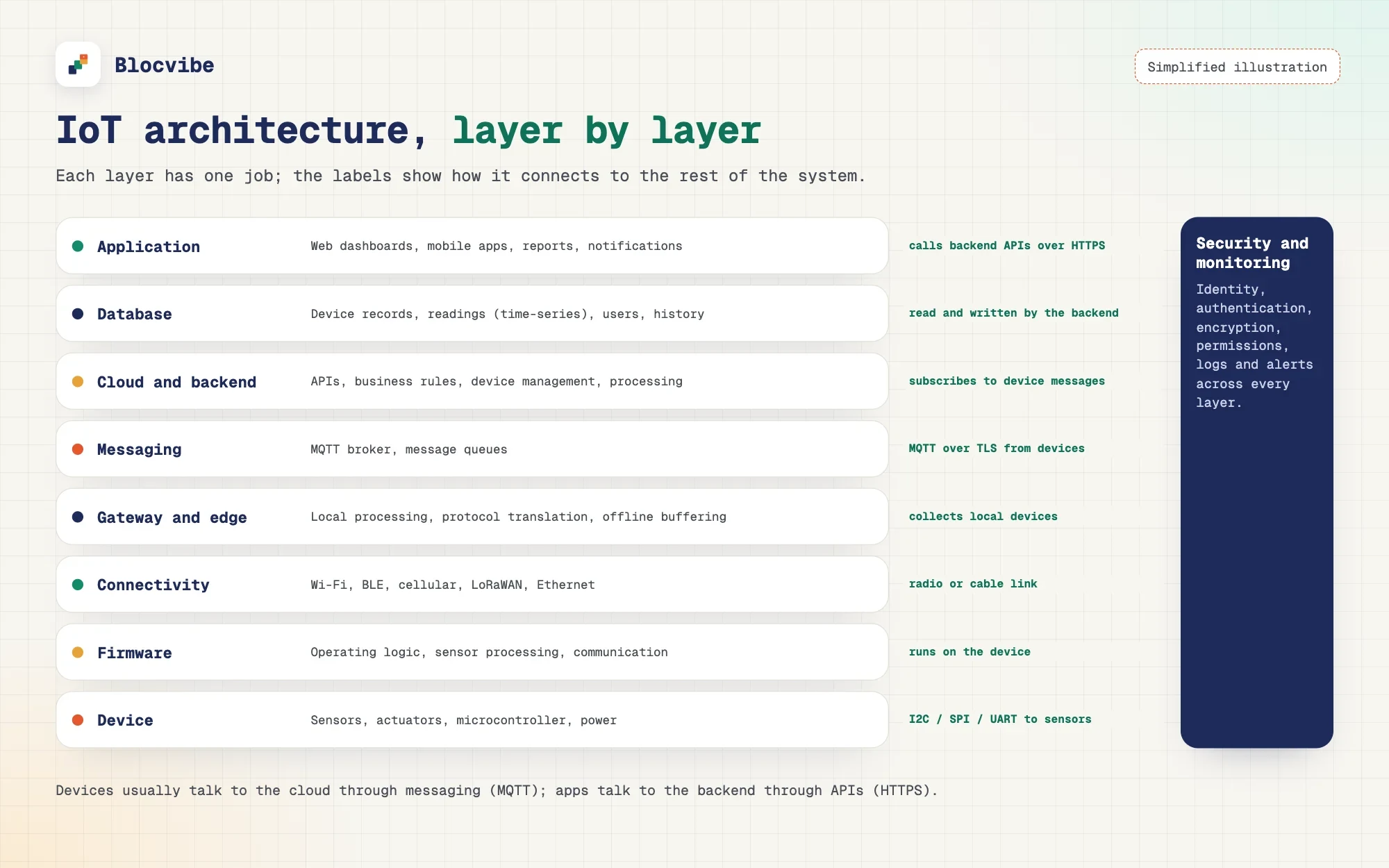
How the layers communicate matters. Inside the device, the microcontroller talks to sensors over short wired interfaces (I2C, SPI, UART). Devices usually send telemetry to the cloud through messaging, publishing to an MQTT broker over an encrypted connection. The backend subscribes to those messages, processes them and writes to the databases. Apps use APIs over HTTPS to read data and send commands; they never connect to devices or databases directly.
IoT security and cybersecurity
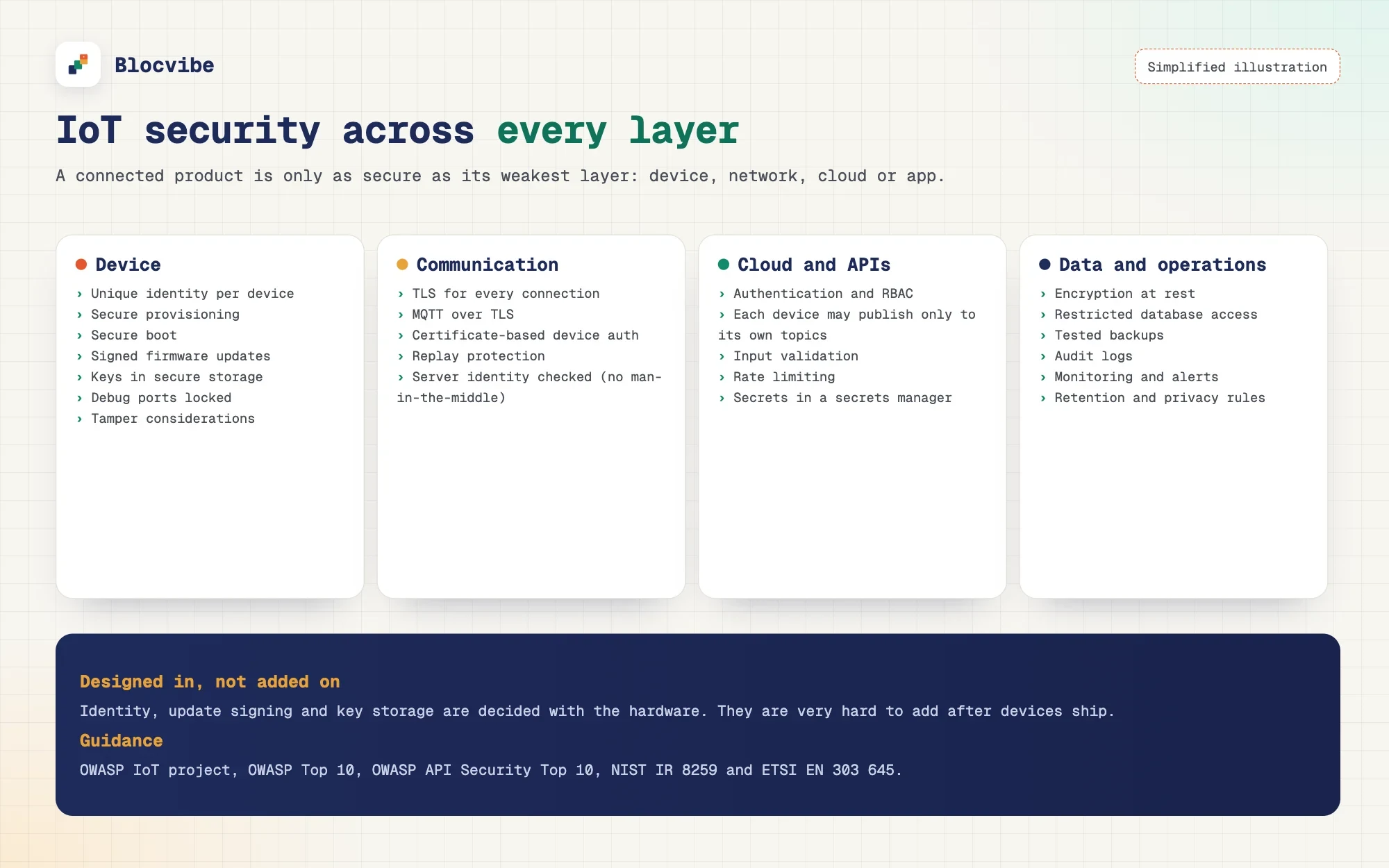
IoT security is not only about protecting a website. An attacker can target the physical device, its firmware, the network, the cloud, the APIs, the database or the app, and a weakness in any one can compromise the whole product. No IoT product can honestly be called completely secure; the goal is to reduce risk deliberately and keep reducing it throughout the product's life. Security also has to be decided at the design stage, because many protections, such as secure key storage and signed updates, depend on hardware choices that cannot be changed after devices ship.
Device security
- Unique device identity: every device has its own credentials, never a shared password or key across a product line.
- Secure provisioning: those credentials are created and installed in a controlled process.
- Secure boot and firmware integrity: the device runs only firmware that is genuine and unmodified.
- Signed firmware updates: the device accepts an update only if it carries a valid signature from the manufacturer.
- Secure key storage: keys live in protected hardware, such as a secure element, where they are hard to extract.
- Debug interface protection: the connectors engineers use during development are locked in production units.
- Physical tampering: considered wherever devices are publicly accessible.
Communication security
- TLS and HTTPS encrypt data in transit, including MQTT over TLS.
- Certificate-based authentication lets the device and server each prove who they are.
- Man-in-the-middle protection: the device checks the server's identity, so an attacker cannot pose as the cloud.
- Replay protection: message counters or timestamps stop an attacker re-sending an old, valid command such as "unlock".
Application and API security
- Authentication and authorisation with role-based access control (RBAC): a technician can see their sites' devices, not every customer's.
- Per-device permissions on the broker: each device may publish and subscribe only to its own topics.
- API key and token management, with OAuth 2.0 where third parties need access.
- Input validation on every message and request, from devices as well as users.
- Rate limiting and secure session management.
- Protection against broken access control, SQL injection, cross-site scripting (XSS) and cross-site request forgery (CSRF) in the web applications.
Cloud and database security
- Encryption at rest for databases, files and backups.
- Secrets management: keys and passwords in a secrets manager, never in code.
- Network restrictions: databases and internal services unreachable from the internet.
- Database access control, secure backups and audit logs.
- Monitoring, plus data retention and privacy rules for any personal data the devices collect.
IoT-specific threats, in plain English
| Threat | What it means | How it is reduced |
|---|---|---|
| Unauthorised device access | Someone controls or reads a device they should not | Unique credentials, authentication, permissions |
| Weak default passwords | Every unit ships with the same easy password | Unique per-device credentials; no universal defaults |
| Device spoofing | A fake device pretends to be a real one and sends false data | Certificate-based device identity |
| Firmware tampering | Modified firmware is installed on a device | Secure boot and signed firmware |
| Insecure OTA updates | An attacker pushes a malicious update | Signed updates, verified before installing |
| Exposed MQTT brokers | A broker open to the internet without authentication | Authentication, TLS, per-device topic permissions |
| Data interception | Readings or commands captured in transit | TLS everywhere |
| Denial of service | Devices or servers flooded until they stop working | Rate limiting, scalable ingestion, monitoring |
| Compromised third-party libraries | A vulnerable component inside firmware or software | Dependency tracking and timely patches |
Recognised guidance helps structure the work: the OWASP Internet of Things project, the OWASP Top 10 and OWASP API Security Top 10, NIST's IR 8259, Foundational Cybersecurity Activities for IoT Device Manufacturers, and ETSI EN 303 645 for consumer IoT. Regulation is tightening too: the UK's product security regime for consumer connectable products has applied since 29 April 2024, and the EU's Cyber Resilience Act applies its reporting obligations from 11 September 2026 and its main obligations from 11 December 2027. Check which rules apply to your product and markets early, with legal advice where needed.
Important IoT terms every business owner should understand
A plain-English glossary, grouped by area. Each term has its technical meaning, a simple explanation with an example, and why it matters.
Hardware and embedded systems
| Term | Technical meaning | In plain English, with an example | Why it matters |
|---|---|---|---|
| IoT | Physical devices that sense or act and exchange data over a network | Everyday objects that report and respond, such as a connected meter | Defines the whole product, not just the device |
| Embedded system | A computer built into a device to perform dedicated functions | The hidden computer inside a washing machine or sensor | Most IoT devices are embedded systems with tight limits |
| Microcontroller | A single chip with processor, memory and inputs/outputs | A tiny, low-power computer that reads a sensor every minute | Drives cost, battery life and what the device can do |
| Microprocessor | A more powerful processor that usually runs a full operating system | The brain of a gateway running Linux | Needed for heavier processing, at higher power and cost |
| Sensor | A component that converts a physical quantity into a signal | A thermometer the device can read electronically | Accuracy and reliability start here |
| Actuator | A component that produces physical action from a signal | A relay that switches a pump on | Lets the system act, not just observe |
| PCB | Printed circuit board connecting electronic components | The green board everything is soldered to | Affects cost, reliability and radio performance |
| GPIO | General-purpose input/output pins on a chip | A pin that reads a button or switches an LED | The simplest way the chip talks to the world |
| ADC | Analogue-to-digital converter | Turns a sensor's varying voltage into a number | Determines measurement precision |
| UART, SPI, I2C | Common wired interfaces between chips and components | The "cables" a microcontroller uses to talk to sensors and modules | Shape which components can be combined |
Firmware
| Term | Technical meaning | In plain English, with an example | Why it matters |
|---|---|---|---|
| Firmware | Software stored on a device that controls its hardware | The instructions that tell a sensor when to measure and send | Determines behaviour, reliability and updatability |
| Bootloader | Small program that runs first and starts the main firmware | The device's "starter motor", which can also install updates | Key to safe updates and secure boot |
| RTOS | Real-time operating system for predictable multitasking | Lets firmware read sensors and talk to the network at the same time | Helps complex devices stay responsive |
| OTA updates | Over-the-air firmware updates | Fixing a bug on 5,000 devices without visiting any of them | Essential for security and long-term support |
| Secure boot | Verifying firmware authenticity before it runs | The device refuses to start tampered software | Protects against firmware tampering |
| Device provisioning | Giving a device its identity, credentials and settings | Registering a new sensor so the cloud trusts it | Foundation of device security and management |
Connectivity and protocols
| Term | Technical meaning | In plain English, with an example | Why it matters |
|---|---|---|---|
| Wi-Fi | Wireless local network standard | The same network your laptop uses | Fast but power-hungry and depends on local networks |
| BLE | Bluetooth Low Energy, short-range low-power radio | Pairing a sensor with your phone during setup | Long battery life, short range |
| LoRaWAN | Long-range, low-power wide-area network | A soil sensor reporting from a field kilometres away | Years of battery life for small, infrequent readings |
| MQTT | Lightweight publish/subscribe messaging protocol | Devices post short messages to a central "noticeboard" (the broker) | Efficient, reliable device-to-cloud messaging |
| HTTP / HTTPS | Request-response protocol of the web; HTTPS is encrypted | How apps ask the backend for data | Standard for APIs; always use HTTPS |
| Gateway | Device that bridges local devices and the internet | A hub that collects Zigbee sensors and forwards their data | Connects devices that cannot reach the cloud alone |
| Edge computing | Processing data near its source | Analysing vibration on the factory floor, sending only results | Faster decisions, lower data costs, offline resilience |
| Latency | Delay between sending and receiving data | How long an alarm takes to appear on screen | Critical for control and safety use cases |
| Bandwidth | How much data a connection can carry | Whether you can stream readings or only send summaries | Drives connectivity choice and running cost |
Software and cloud
| Term | Technical meaning | In plain English, with an example | Why it matters |
|---|---|---|---|
| API | Defined interface for software systems to exchange data | The app asks the backend for the last 24 hours of readings | Keeps apps and integrations secure and consistent |
| Webhook | A call made automatically to a web address when an event happens | The platform notifies your ticket system when a device fails | Connects IoT events to other business systems |
| Cloud computing | On-demand computing and storage from a provider | Servers in a data centre instead of in your office | Scales with the number of devices |
| Message broker | Service that receives and distributes messages | The MQTT "post office" between devices and backend | Absorbs bursts and decouples devices from services |
| Backend | Server-side software holding business logic and data access | Decides when a reading becomes an alert | Where rules, security and integrations live |
| Frontend | The user-facing part of an application | The dashboard and mobile app screens | Determines how usable the product feels |
| Database | Organised, persistent data storage | Where devices, users and settings are recorded | Reliability, speed and history depend on it |
| Time-series database | Database optimised for timestamped data | Stores millions of temperature readings for charts | Keeps historical charts fast and storage efficient |
| Scalability | Ability to handle growth without redesign | Going from 50 pilot devices to 50,000 | Decides whether success becomes a crisis |
Security
| Term | Technical meaning | In plain English, with an example | Why it matters |
|---|---|---|---|
| Authentication | Verifying identity | A device proving it is sensor #1042 | Stops fake devices and users |
| Authorisation | Deciding what an identity may do | A technician can view, but not delete, devices | Limits damage from mistakes and attacks |
| Encryption | Encoding data so only authorised parties can read it | Readings scrambled while travelling to the cloud | Protects data in transit and at rest |
| TLS | Transport Layer Security, the protocol behind HTTPS | The padlock on a connection, used for MQTT too | Prevents interception and tampering in transit |
Product delivery
| Term | Technical meaning | In plain English, with an example | Why it matters |
|---|---|---|---|
| PoC | Proof of concept: a minimal build proving feasibility | Showing the sensor can detect a bearing fault at all | Answers "can it work?" cheaply |
| MVP | Minimum viable product: the smallest usable complete product | Twenty devices, a dashboard and alerts for one customer | Answers "do users value it?" before scaling |
A worked example: industrial machine monitoring
To bring it together, here is how a business could monitor pumps and motors remotely. This is an illustrative example with sample data and a typical architecture, not a specific client project.
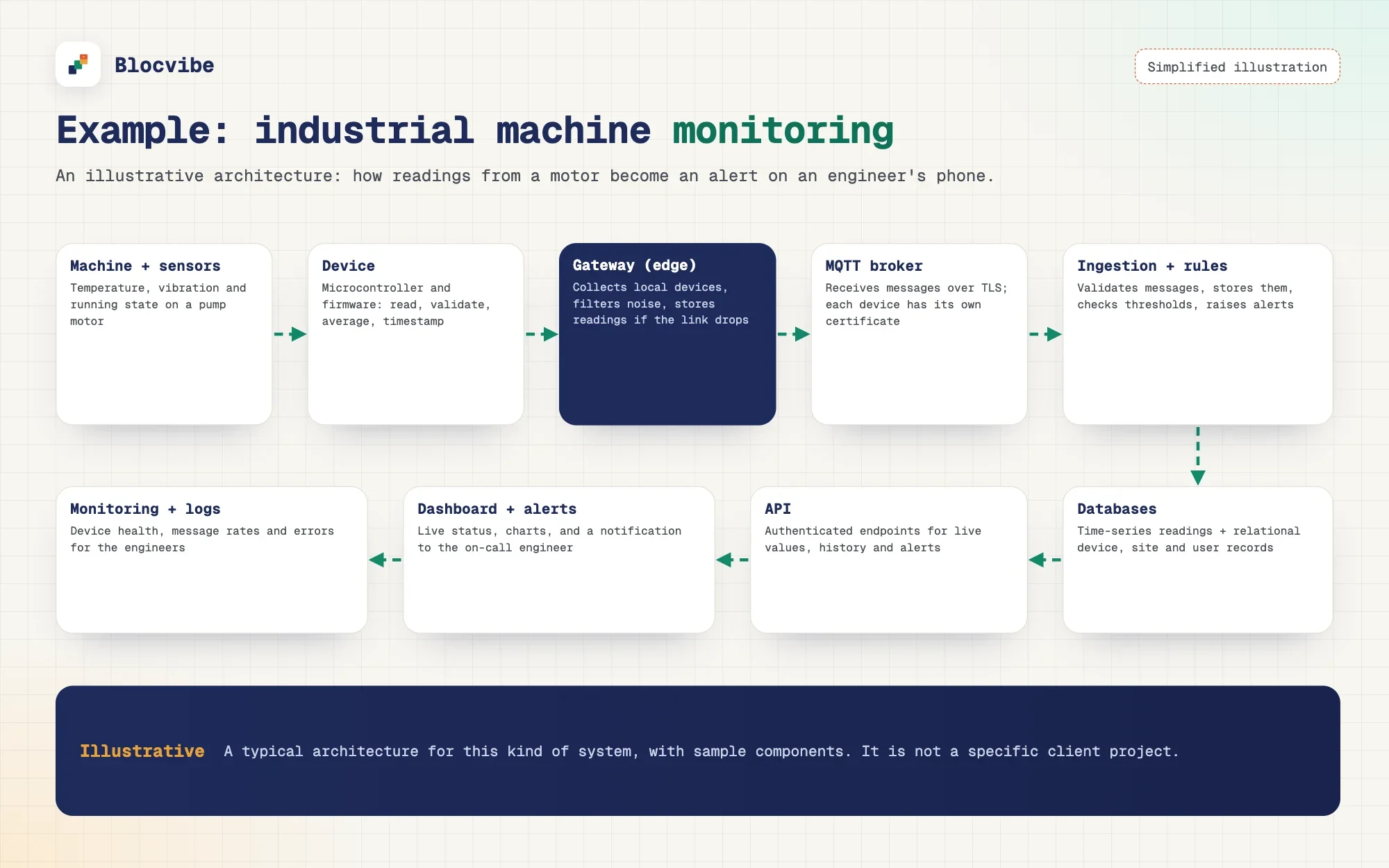
- Sensors on each pump measure motor temperature, vibration and whether it is running.
- The microcontroller reads them several times a second.
- Firmware checks the readings are within physical limits, averages them over a minute, and adds a timestamp and a message counter.
- The device sends the summary over an encrypted connection.
- A gateway on site collects messages from all pumps and keeps them if the internet connection drops.
- An MQTT broker in the cloud receives the messages; each device authenticates with its own certificate.
- Backend services validate each message and check it against alert rules.
- Databases store readings (time-series) and device, site and user records (relational).
- The web dashboard shows live status and history.
- An alert is generated when a configured threshold is exceeded, such as a temperature above 80 °C for 10 minutes.
- The on-call engineer receives a notification and acknowledges it.
- Monitoring and logs help engineers investigate devices that go quiet or misbehave.
Device-to-cloud message (sample data)
The device publishes a small JSON message to its own MQTT topic, such as plant-1/pump-p02/telemetry:
{
  "deviceId": "pump-p02",
  "ts": "2026-11-28T09:15:00Z",
  "temperatureC": 84.6,
  "vibrationMmS": 6.9,
  "running": true,
  "firmware": "1.4.2",
  "seq": 18342
}
The seq counter lets the backend ignore duplicated or replayed messages, and the firmware version helps support teams see which devices need updating.
App-to-backend API call (sample)
When the dashboard draws the 24-hour chart, it asks the backend through an authenticated API request:
GET /api/v1/devices/pump-p02/readings?from=2026-11-27T09:15:00Z&to=2026-11-28T09:15:00Z&interval=5m
Authorization: Bearer <the signed-in user's access token>

200 OK
{
  "deviceId": "pump-p02",
  "interval": "5m",
  "readings": [
    { "ts": "2026-11-28T09:05:00Z", "temperatureC": 83.9, "vibrationMmS": 6.8 },
    { "ts": "2026-11-28T09:10:00Z", "temperatureC": 84.3, "vibrationMmS": 6.9 }
  ]
}
Before answering, the backend checks that the user is signed in and allowed to see this site's devices, and it returns five-minute averages rather than every raw reading, which keeps the chart fast.
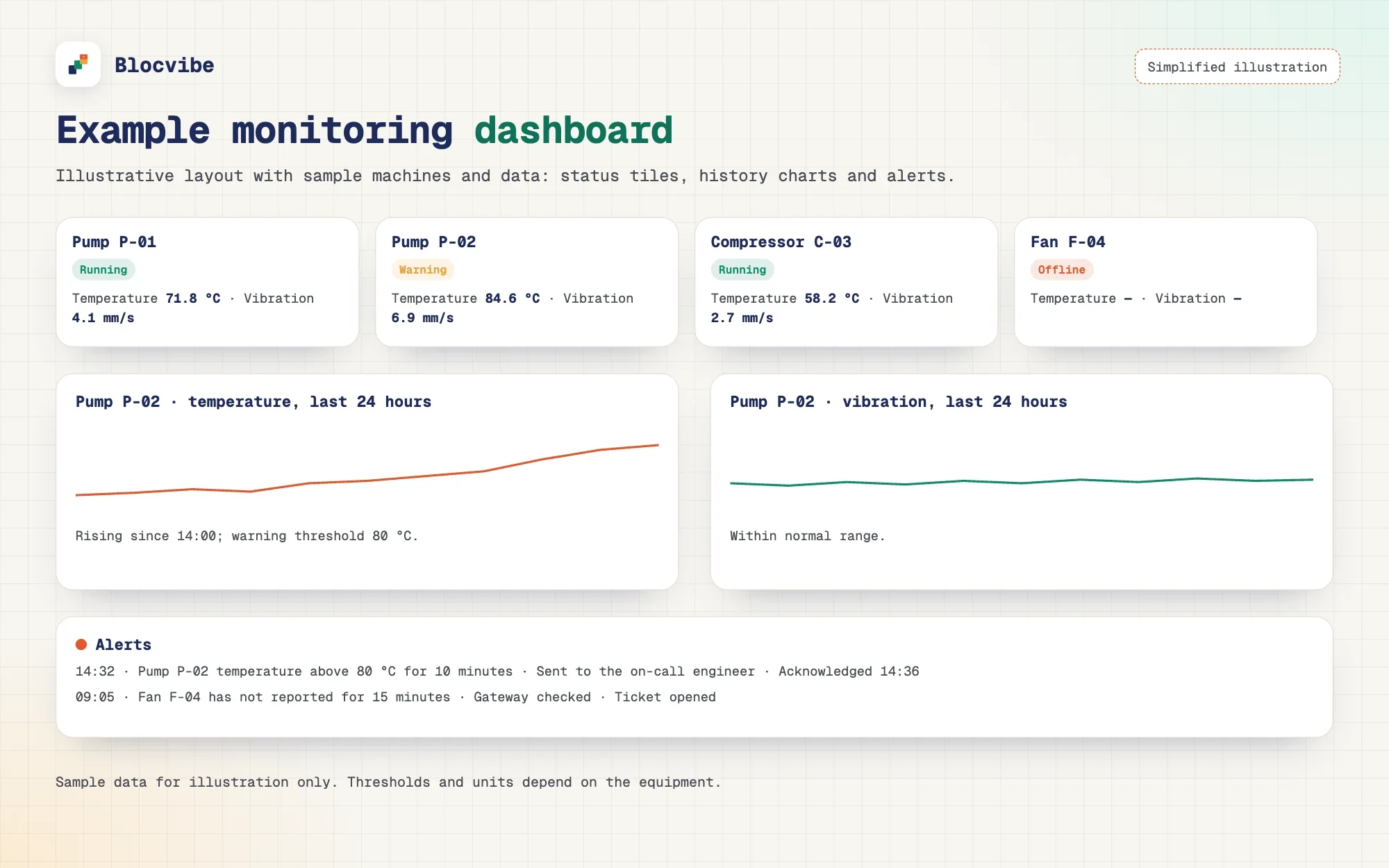
Security controls in this example: a unique certificate per device, TLS for every connection, per-device topic permissions on the broker, signed firmware updates, role-based access in the app, encrypted storage and audit logs.
Testing considerations: simulate a network outage and confirm the gateway catches up afterwards; send duplicate messages and confirm they are ignored; load-test with the full number of devices; confirm a technician cannot see another site's pumps; and run a pilot on a small number of real machines before rolling out.
IoT development technology stack
These are common examples, not a required stack. The right choices depend on the device, the requirements, the budget, performance needs, the team's expertise and long-term maintenance.
| Layer | Technology examples |
|---|---|
| Embedded hardware | ESP32, STM32, Raspberry Pi (for gateways and prototypes) |
| Firmware | C, C++, Embedded Rust |
| RTOS | FreeRTOS, Zephyr |
| Connectivity | Wi-Fi, BLE, LoRaWAN, cellular (LTE-M, NB-IoT) |
| Protocols | MQTT, HTTP/HTTPS, CoAP, WebSockets |
| Backend | Node.js, Python, Laravel |
| Messaging | MQTT brokers, message queues |
| Database | PostgreSQL, MySQL, InfluxDB and other time-series databases |
| Cloud | AWS, Azure, Google Cloud |
| Frontend | React, Next.js |
| Mobile | Flutter, React Native (see our Flutter vs React Native guide) |
| Monitoring | Logs, metrics, alerts and device health monitoring |
Common IoT development challenges
| Challenge | Business impact | Engineering response |
|---|---|---|
| Hardware and software integration | Delays when parts are built separately and do not fit | Design together; integrate early and often |
| Unstable connectivity | Gaps in data, false "offline" alerts | Offline buffering, retries, choosing the right network |
| Power consumption and battery life | Costly site visits to change batteries | Low-power design, sleep modes, measured battery testing |
| Device compatibility | Older machines or phones do not work | Gateways, protocol conversion, testing on real equipment |
| Data accuracy | Wrong decisions from wrong readings | Sensor calibration, validation in firmware and backend |
| Security vulnerabilities | Breaches, recalls, regulatory penalties | Security by design, testing and patching |
| Firmware updates | Bricked devices or unfixable bugs | Signed OTA updates with rollback and staged rollout |
| Cloud costs | Running costs that grow faster than revenue | Edge filtering, data retention policies, efficient storage |
| Scaling from prototype to thousands | Systems that work for 20 devices fail at 20,000 | Load testing, scalable messaging and databases |
| Manufacturing consistency | Units that behave differently | Production testing and provisioning on the line |
| Long-term maintenance | Unsupported devices in the field | Planned support period, monitoring and update budget |
IoT product development cost and planning
There is no meaningful "typical price" for an IoT product: a simple sensor that reports to an existing platform and a certified industrial device with custom electronics, firmware, cloud platform and apps differ by orders of magnitude. What drives cost:
- Product complexity and the number of device types.
- Hardware components, PCB design and the enclosure.
- Firmware development and update infrastructure.
- Connectivity, including data plans for cellular devices.
- Cloud infrastructure and backend development.
- Web and mobile applications.
- Security implementation and testing.
- Testing and certification, such as radio and safety approvals for the markets you sell in.
- Manufacturing, tooling and production testing.
- Maintenance and support for the product's whole life.
From PoC to production
| Stage | Answers the question | Typical scope |
|---|---|---|
| Proof of concept | Can it work? | Off-the-shelf parts, rough software, lab conditions |
| MVP | Will users value it? | Working devices, core cloud and app, limited users |
| Pilot deployment | Does it work in the real world? | Tens to hundreds of devices at real sites, monitored closely |
| Production | Can it be built, sold and supported at scale? | Final hardware, certification, manufacturing, full platform and support |
A practical roadmap is: validate the idea → define requirements → proof of concept → MVP → pilot → production → continuous improvement. Each step should end with a clear decision about whether, and how, to continue.
How Blocvibe can help
Blocvibe builds the software and data side of connected products: IoT software development that collects device and sensor data, Industrial IoT solutions that turn machine data into maintenance and production insight, and IoT monitoring dashboards with live status, alerts and reports, along with the APIs, cloud backends and mobile apps around them. Hardware, electronics and embedded firmware are delivered through qualified partners, and we coordinate that work with them, so the device, cloud and apps are designed as one product.
If you are planning a connected product or want to put existing equipment online, tell us about your project. We can help you validate the idea, choose an architecture, plan security from the start and decide what to build first.
 By Blocvibe