If you are planning your first mobile app, you will hear two names again and again: Flutter and React Native. Both let one team build an app for iPhone and Android from a single codebase, and both are used in serious products. Developers argue about them with real passion, which does not help when you are the person who has to sign off the budget.
This guide is written for founders, business owners and product managers rather than developers. It explains what actually happens behind the scenes when an app is built, how Flutter and React Native work, where each one fits, and why the choice of framework matters less than the decisions around it: architecture, security, scope and maintenance. By the end you should be able to have an informed conversation with any development team, and make a choice you can defend.
Why the choice of mobile technology matters
For many businesses the mobile app is where customers book, order, pay, track and get support. Staff use apps in warehouses, vans and clinics. When the app is slow, confusing or unreliable, customers notice immediately, and the cost shows up in reviews, support calls and lost sales.
The technology behind the app shapes four things a founder cares about:
- Development cost: how many people you need, and how much of the work is done once rather than twice.
- Maintenance: how easy it is to fix bugs, keep up with new iOS and Android versions, and replace developers when people move on.
- Performance and experience: how smooth, fast and native the app feels on real devices.
- Room to grow: whether the app can take on new features, more users and new platforms without a rewrite.
Flutter and React Native are popular because they address cost and speed directly. Instead of writing one app in Swift for iPhone and a second in Kotlin for Android, a team writes most of the app once. That usually means a faster first release and a smaller team. It does not mean the cheapest proposal is the best value: an app that is cheap to start but hard to maintain or secure often costs more over three years than one built carefully from the beginning.
So the real question is not "which framework is best?" but "which technology makes more sense for this startup, this product and this team in 2027?" To answer it, it helps to see the whole picture first.
What happens behind the scenes when an app is built
When people say "the app", they usually mean what they see on their phone. In practice, a working app is several pieces of software that talk to each other. A useful way to picture it is a restaurant: the menu and dining room are what customers see; the kitchen does the real work; the storeroom holds the ingredients; and waiters carry orders between them.
| Component | What it does | Restaurant comparison |
|---|---|---|
| UI/UX design | Plans every screen, button and journey before anything is built | Designing the menu and the dining room |
| Frontend (the mobile app) | What the customer sees and touches on their phone | The dining room and the menu |
| Backend | The server that runs the business rules: prices, bookings, permissions, payments | The kitchen |
| Database | Organised storage for customers, orders and every other record | The storeroom and its stock list |
| API | The agreed way the app and the backend exchange requests and answers | The waiter and the order slip |
| Authentication | Checks who is using the app and what they are allowed to do | The host checking the reservation |
| Hosting and cloud | The servers and services that keep everything running day and night | The building, power and water |
| Third-party integrations | Outside services such as payments, email, maps and SMS | Suppliers who deliver what the kitchen does not make |
| Testing and deployment | Checking it all works, then releasing it to the app stores and servers | Inspections before opening night |
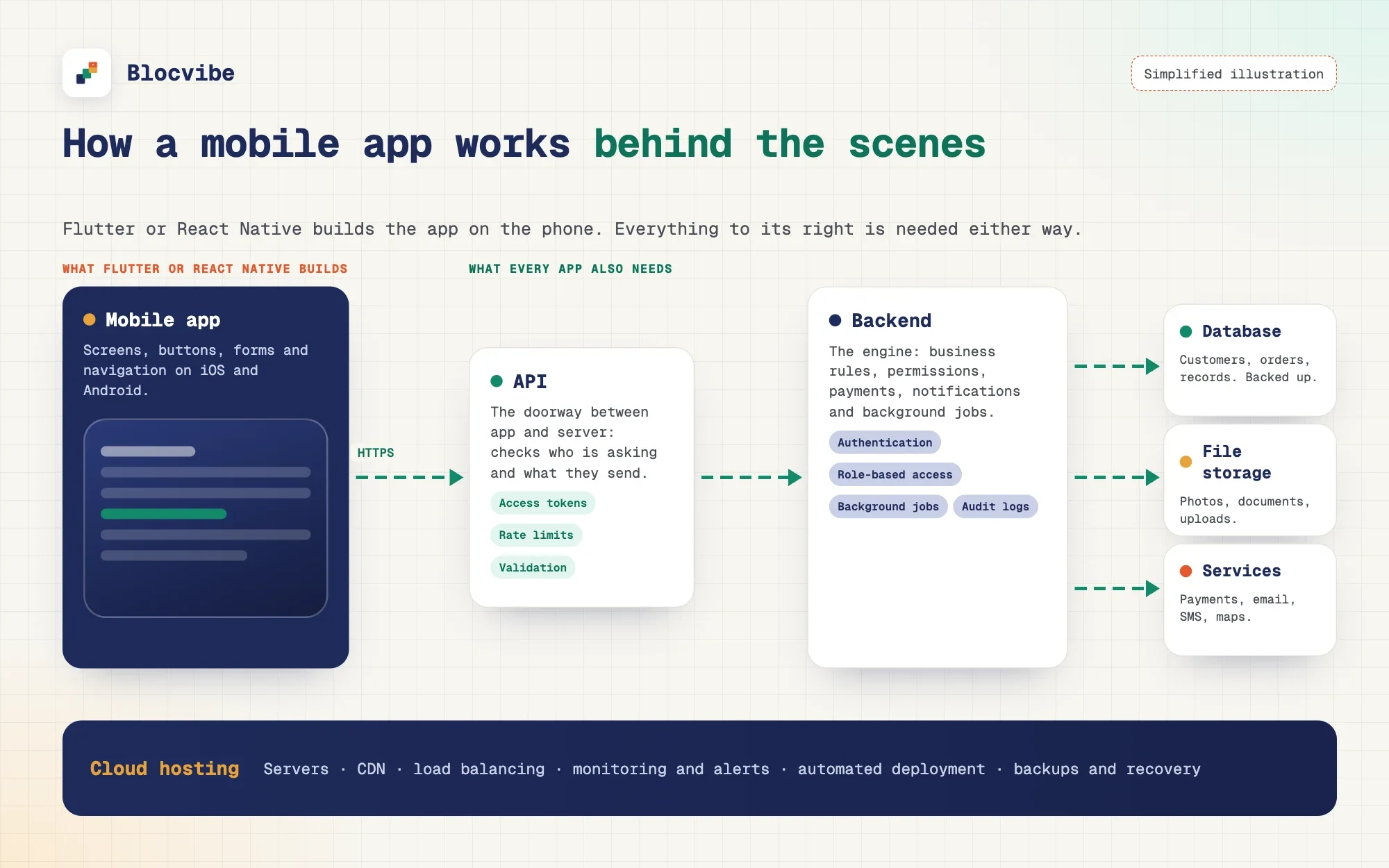
Here is what happens when a customer taps "Book appointment" in a typical app:
- The app (the frontend) collects the date, time and service, and sends them to the backend over an encrypted connection.
- The API receives the request and checks that it comes from a signed-in customer with a valid access token.
- The backend applies the business rules: is the slot still free, is the customer allowed to book, does a deposit apply?
- The backend saves the booking in the database, asks the payment provider to take the deposit, and queues a confirmation email or push notification.
- The API sends the result back, and the app shows "Booked" within a second or two.
This matters for the Flutter versus React Native decision because both frameworks only build the first piece: the app on the phone. The backend, database, API, security, hosting and integrations have to be designed and built either way, and they often account for as much effort as the app itself. If a proposal compares frameworks but says little about the rest, ask about it.
What is Flutter?
Flutter is an open-source toolkit created and maintained by Google for building apps for iOS, Android, the web, Windows, macOS and Linux from one codebase. It is written in Dart, a programming language also developed by Google, which is designed to be quick to write during development and to compile into fast machine code for release.
Widgets: the building blocks
Think of a Flutter app as something built from building blocks. Every button, text label, menu, form field, list and even whole screens are made from reusable pieces called widgets. Developers combine small widgets into larger ones, much like assembling a kitchen from standard units. Because the same widget can be reused everywhere, a design system (your colours, fonts, button styles) can be applied consistently across the whole app.
How Flutter puts pixels on the screen
Flutter's most distinctive choice is that it draws its own interface. Rather than asking iOS or Android to display their built-in buttons, Flutter paints every pixel itself using its rendering engine, called Impeller, which has been the default on iOS and on Android devices running Android 10 (API level 29) or later since Flutter 3.27. A useful comparison is a printed brochure: the same file produces the same result whichever printer you use. That is why Flutter apps look the same on iPhone and Android unless the team chooses otherwise.
Talking to the phone's own features
Apps need the camera, location, notifications, Bluetooth and biometric login. Flutter reaches these through a layer called the platform embedder and through platform channels and plugins, which pass messages between the Dart code and native iOS or Android code. Most common features already have well-used plugins; anything unusual may need a small amount of native code written in Swift or Kotlin.
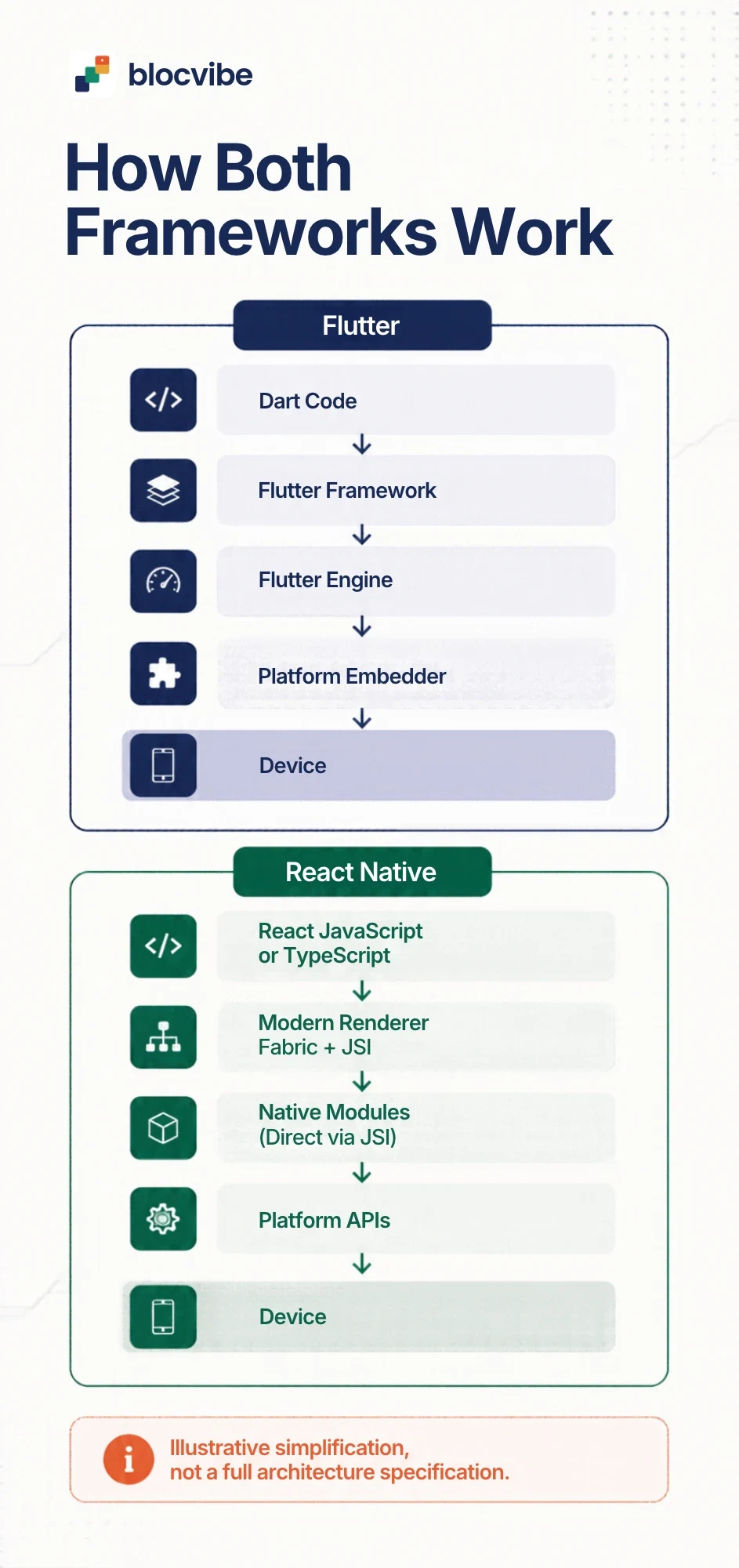
In simplified form, the layers look like this: your app's widgets → the Flutter framework → the Flutter engine → the platform embedder → iOS or Android. This is a conceptual summary; Google's architectural overview describes the details.
Strengths and limitations
- Strengths: a highly consistent look across platforms; strong control over custom design and animation; a large set of ready-made widgets; fast development with "hot reload", which shows code changes in seconds; good built-in testing tools; one language for the whole app.
- Limitations: Dart is less widely known than JavaScript, so the hiring pool is smaller; because Flutter draws its own interface, matching every small platform convention takes deliberate work; apps include the Flutter engine, which adds to the download size; and some specialised native features depend on plugins whose quality and maintenance vary.
What is React Native?
React Native is an open-source framework created by Meta for building iOS and Android apps with JavaScript or TypeScript and React, the same library many companies already use for their websites. Developers describe each screen as a set of components, and React Native turns those components into the phone's own native interface elements.
Components that become real native views
Where Flutter paints its own interface, React Native uses the platform's real building blocks. A React Native button becomes a genuine iOS or Android view. To return to the comparison, it is less like a printed brochure and more like a set of instructions that each country's builders carry out with local materials: the layout is the same, but each platform's familiar look, scrolling and text handling come for free.
The New Architecture: Fabric, TurboModules and JSI
Older versions of React Native passed messages between JavaScript and the native side through a "bridge", rather like two teams sending letters back and forth: it worked, but every exchange took time. The New Architecture replaces that with direct communication:
- JSI (JavaScript Interface) lets JavaScript call native code directly, more like a phone call than a letter.
- Fabric is the new rendering system that creates and updates native views, with support for modern React features.
- TurboModules are native modules (camera, storage, sensors) that load only when the app needs them and are called through JSI.
The New Architecture became the default in React Native 0.76 (October 2024), and React Native 0.82 (October 2025) was the first release to run entirely on it. React Native also ships with Hermes, a JavaScript engine designed for mobile apps. Many new projects use Expo, a framework and set of tools around React Native that handles much of the build and release work.
In simplified form: your React components → the React Native runtime → JSI, Fabric and TurboModules → native iOS and Android components and APIs. Again, this is a conceptual summary rather than a full specification.
Strengths and limitations
- Strengths: uses JavaScript and TypeScript, which many developers know; can share knowledge, tooling and sometimes code with a React website; native look and behaviour by default; a very large ecosystem of libraries; and Expo makes builds and over-the-air updates easier to manage.
- Limitations: the experience depends heavily on the quality of third-party libraries, which vary; keeping libraries compatible through major upgrades takes effort; pixel-identical design on both platforms needs more care because each platform renders its own components; and complex native features still need Swift or Kotlin.
Flutter vs React Native: a detailed comparison
Both frameworks are mature, actively maintained and capable of producing excellent apps. The differences are real but rarely decisive on their own. This table summarises them in plain terms.
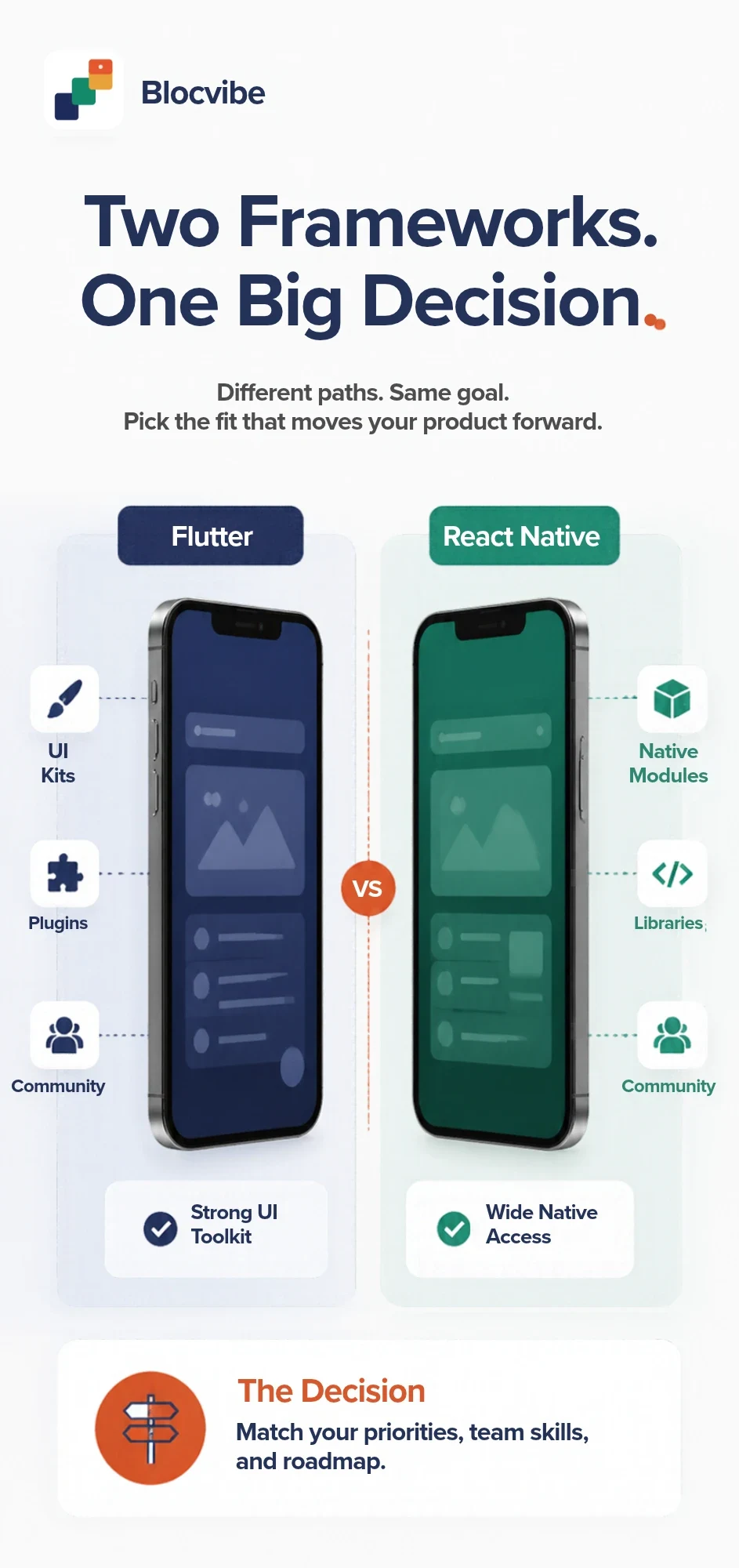
| Aspect | Flutter | React Native |
|---|---|---|
| Programming language | Dart | JavaScript or TypeScript, with React |
| Learning curve | Dart is easy for experienced developers, but new to most | Familiar to web developers who know React |
| How the interface is drawn | Flutter paints every pixel with its own engine | Uses the platform's own native components |
| Look and feel | Identical on both platforms unless customised | Native by default; identical design takes extra work |
| Native features | Plugins and platform channels; native code when needed | Libraries and native modules via JSI; native code when needed |
| Performance | Smooth, predictable rendering when built well | Strong with the New Architecture when built well |
| Development speed | Fast, with hot reload and a rich widget set | Fast, with Fast Refresh and Expo tooling |
| Code sharing | Same code for mobile, web and desktop | Logic and knowledge shared with React web apps |
| Ecosystem | Large and growing package library | Very large JavaScript ecosystem; quality varies |
| Testing | Unit, widget and integration testing built in | Jest and React Native Testing Library; end-to-end tools added |
| Hiring | Smaller pool of Dart developers | Larger pool of JavaScript and React developers |
| Maintenance | Fewer outside dependencies for the interface | Upgrades depend more on third-party libraries |
| App size | Includes the Flutter engine | Includes a JavaScript engine (Hermes) |
| Accessibility | Supported through Semantics widgets; needs testing | Maps to native accessibility features; needs testing |
| Platform-specific design | Possible, but deliberate work | Natural, since native components are used |
| Long-term scalability | Suits large apps with a clear structure | Suits large apps with a clear structure |
| Enterprise use | Used by large organisations worldwide | Used by large organisations worldwide |
Performance depends on your app, not the logo
You will find benchmarks claiming either framework is faster. Most of them test something narrow, on particular devices, with code written in a particular way. In real products, speed depends far more on how the app is built: how much data each screen loads, how images are handled, how lists are rendered, how many third-party libraries are added, and how well the backend responds. A well-built app in either framework feels smooth on modern phones; a poorly built app in either does not.
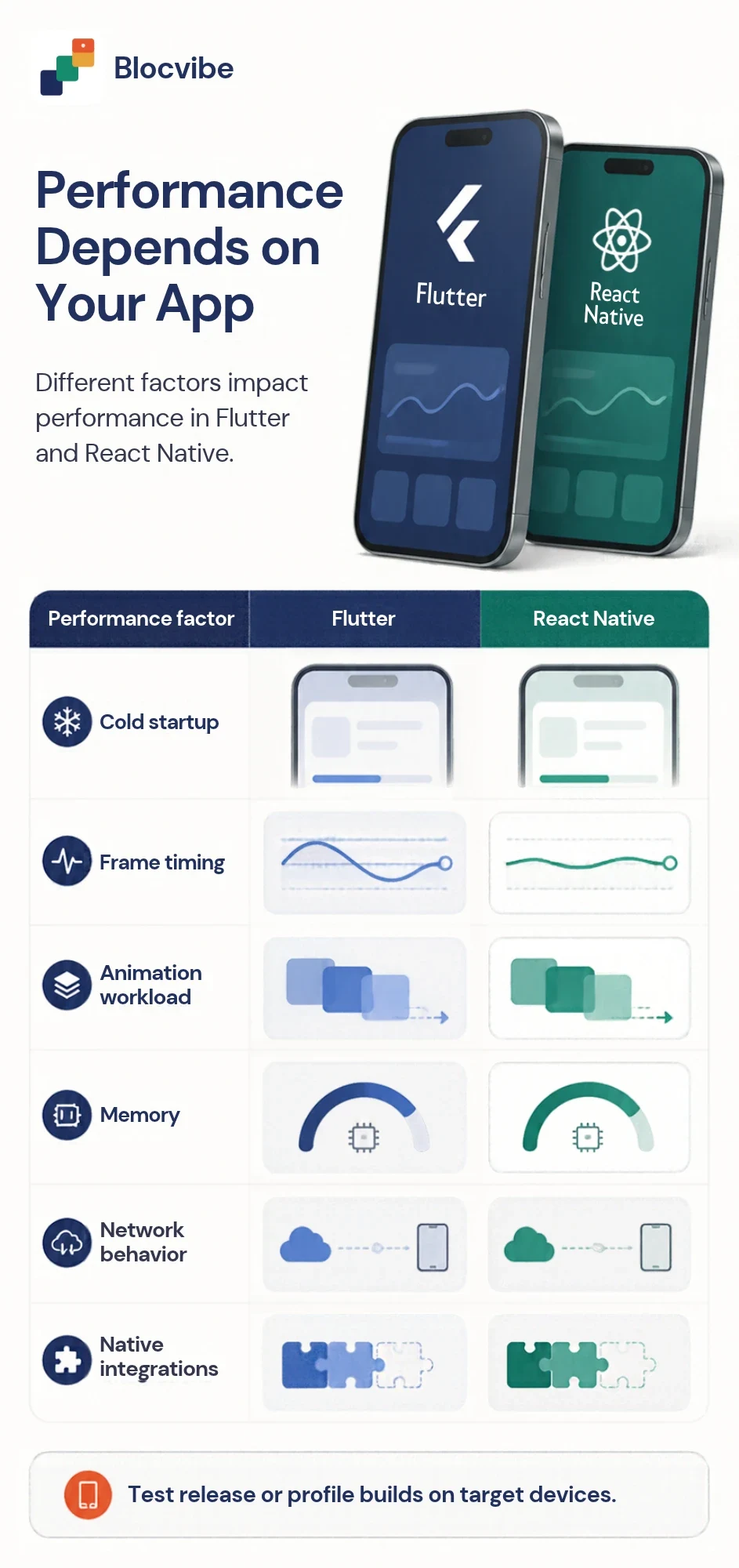
The practical advice is simple: decide what "fast enough" means for your product (start-up time, scrolling, animations), build a small prototype of the most demanding screen, and measure it on the phones your customers actually use, including older, cheaper Android devices.
Look and feel
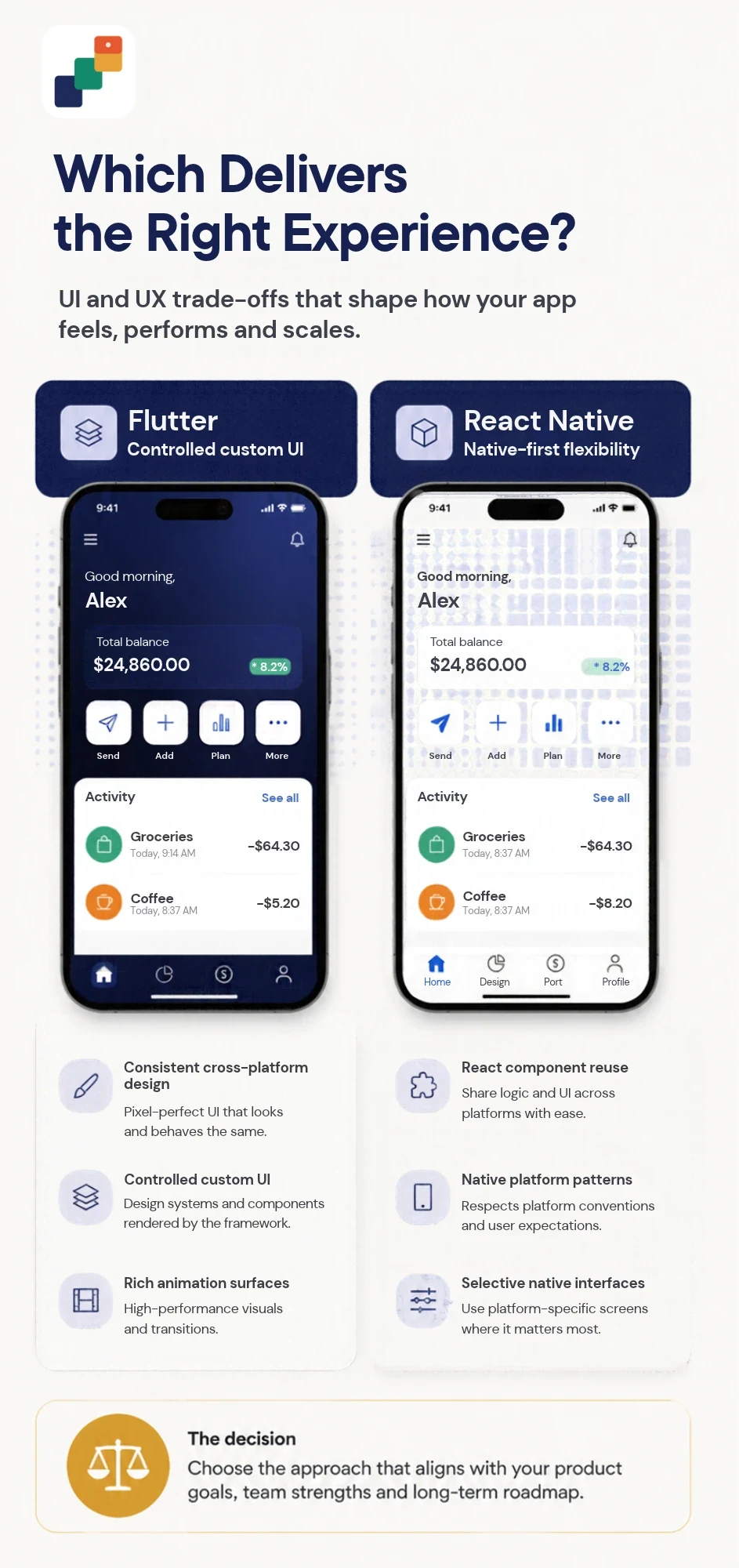
Flutter gives a designer tight control: the app looks exactly as designed on every device, which suits strongly branded products and custom interfaces. React Native leans towards each platform's own conventions, which suits apps that should feel at home on iPhone and Android respectively. Both can be pushed in the other direction; it simply takes more effort.
Application architecture: what startups should understand
Architecture is the plan for how the parts of your software are organised and how they work together. Like a building's floor plan, it is much cheaper to change on paper than after construction. Here are the main areas, in plain terms.
Frontend architecture (the app on the phone)
- Reusable components: buttons, cards and forms built once and reused, so the app stays consistent and changes are quick.
- State management: how the app remembers what is happening, such as who is signed in or what is in the basket, without screens falling out of step.
- Navigation: how users move between screens, including deep links from emails and notifications.
- Forms: validation that helps users fix mistakes before anything is sent.
- API communication: one consistent way to call the backend, handle slow connections and retry safely.
- Local storage and offline use: what the app keeps on the phone, and whether it must work without signal (essential for field teams).
- Error handling: clear messages and automatic error reporting, so problems are found before customers report them.
Backend architecture (the kitchen)
The backend can be written in many languages and frameworks, such as Node.js, Laravel (PHP), Python or .NET. What matters more is that it is well structured. The app talks to it through an API, most commonly a REST API (a set of web addresses for actions such as "create booking") or GraphQL (a single address where the app asks for exactly the data each screen needs). The backend holds the business logic, handles sign-in and permissions, runs background jobs such as sending emails or generating reports, sends push notifications, and connects to outside services.
Database architecture (the storeroom)
- SQL or NoSQL: relational (SQL) databases such as PostgreSQL and MySQL store data in related tables and suit most business apps, where customers, orders and invoices are linked. NoSQL databases store flexible documents and suit some specialised cases.
- Data modelling: deciding what information you store and how it connects. Mistakes here are among the most expensive to fix later.
- Indexing: like the index at the back of a book, it lets the database find records quickly as data grows.
- Backups and consistency: automatic, tested backups, and rules that keep related records in step (no booking without a customer).
Cloud infrastructure (the building)
- Hosting: where the backend runs, usually on a cloud provider.
- Cloud storage and CDN: photos and files kept in dedicated storage and served from locations close to your users.
- Load balancing and scaling: spreading traffic across servers and adding capacity when demand grows.
- Monitoring: alerts when something slows down or fails, before customers notice.
- Automated deployment: releasing updates safely and repeatably, with a way to roll back.
What to decide early, and what can wait
Decide early: the platforms you need, the core data model, how users sign in and what each role can do, whether the app must work offline, where data is hosted, and your security approach. These shape everything else. Things that can evolve: the exact hosting size, caching, analytics, advanced reporting, automation and extra integrations. Start with a simple, well-organised structure that can grow, rather than building for a scale you have not reached.
Application security: what happens behind the scenes
Security is not a feature you add at the end. It is a set of habits built into every layer of the app, the API, the backend and the cloud. Neither Flutter nor React Native makes an app secure automatically; security depends on the architecture, the code, the infrastructure and how the system is run. The good news is that well-established guidance exists: the OWASP Top 10 for web and API risks, the OWASP Mobile Application Security Verification Standard (MASVS) for mobile apps, the OWASP Mobile Top 10, and the OWASP Application Security Verification Standard (ASVS) for the backend.
Authentication and authorisation: who you are, and what you may do
- Secure login: passwords are never stored as they are typed. The backend stores a one-way "hash", like a fingerprint that can be checked but not turned back into the password (see the OWASP Password Storage Cheat Sheet).
- Access and refresh tokens: after login, the app receives a short-lived access token, like a day pass, and a longer-lived refresh token used to get a new pass. If a pass is stolen, it expires quickly, and the refresh token can be revoked.
- Multi-factor authentication: a second check, such as a code or a passkey, for accounts that matter, and always for administrators.
- Role-based access control (RBAC): each role (customer, staff, manager, admin) can only see and do what it needs.
Why hiding a button is not security. Imagine an app that only shows the "Refund order" button to managers. A determined user can still send the refund request directly to the API without using the app at all. The backend must check, on every request, that the person really is a manager and that the order belongs to their branch. The app's interface is for convenience; the backend is where permissions are enforced.
API security: guarding the doorway
- HTTPS/TLS everywhere: all traffic is encrypted, so it cannot be read or altered on public Wi-Fi.
- Authentication on every endpoint: including the ones "only the app uses", because anyone can call an API directly.
- Server-side authorisation: every request is checked against the user's role and the specific record they are asking for.
- Input validation: the backend checks every value it receives, because data from the outside world cannot be trusted.
- Rate limiting: limits on how often sign-in, password reset, search and messaging can be used, to stop guessing attacks and abuse.
Mobile app security: what lives on the phone
- Secure local storage: tokens and sensitive data go in the phone's protected storage (the iOS Keychain or Android Keystore, used through well-maintained packages), never in plain files or general settings.
- No secrets in the app: anything shipped inside an app can be extracted by someone who downloads it. API keys that grant real power, such as payment or database keys, belong on the server, never in the app.
- Network security: the app only talks to your servers over HTTPS and validates their certificates. Certificate pinning can add protection for high-risk apps, but it needs careful management.
- Sensitive information: minimise what is cached on the device, hide sensitive screens in the app switcher where appropriate, and keep personal data out of logs.
- Files: uploads are checked on the server for type and size, and stored safely.
Backend and database security
- SQL injection prevention: database queries are built safely so that user input can never be run as a command.
- Encryption at rest: databases, backups and file storage are encrypted on disk.
- Restricted access: databases are not exposed to the internet, and the app's database account has only the permissions it needs.
- Secrets management: passwords and keys live in environment variables or a secrets manager, separate for each environment, and are rotated if exposed.
- Backups and recovery: automatic backups that are regularly test-restored.
- Audit logs, monitoring and alerts: a record of important actions (sign-ins, permission changes, exports) and alerts when something unusual happens.
Common vulnerabilities, in plain English
| Vulnerability | What it means |
|---|---|
| Broken access control | Users can see or change data that is not theirs, for example by changing an ID in a request |
| Injection | Input is treated as a command, such as a database query |
| Cross-site scripting (XSS) | Malicious script runs in a web view or admin panel that displays user content |
| Insecure data storage | Tokens or personal data left readable on the phone |
| Insecure communication | Data sent without encryption, or certificates not validated |
| Weak authentication | Guessable passwords, no rate limits, tokens that never expire |
| Vulnerable dependencies | Outdated third-party libraries with known security flaws |
None of these depends on choosing Flutter or React Native. All of them depend on careful design, code review, testing and keeping dependencies up to date.
Development cost: what really drives it
Choosing Flutter or React Native rarely changes a project's cost as much as people expect, because the framework only affects the app layer, and both share most of the code between iOS and Android. The real cost drivers are:
- Design complexity: a clean, standard interface costs less than custom animations and illustrations on every screen.
- Number of screens and user roles: each role (customer, staff, admin) adds screens, permissions and testing.
- Backend requirements: business rules, scheduling, calculations and reports.
- Integrations: payments, accounting, CRM, maps, messaging, hardware.
- Authentication: social login, single sign-on and multi-factor authentication.
- Admin dashboard: most apps need a web panel for staff to manage content, users and orders.
- Security and compliance: sensitive data, payments and health information need more controls and testing.
- Testing: automated tests, real-device testing and app store review.
- Hosting and maintenance: monthly infrastructure and third-party fees, plus ongoing updates for new iOS and Android versions.
Consider one idea, a booking app for a small chain of salons, built in two ways:
- A focused first version: customers browse services and book a slot; staff see the day's bookings; confirmations go by email. One payment option, a simple admin panel, no offline mode.
- A full version: deposits and refunds through two payment providers, loyalty points, staff rotas, multiple branches with different permissions, SMS reminders, reviews, an analytics dashboard and offline use for staff.
The second could easily take several times the effort of the first, in Flutter or React Native alike. That is why a reliable estimate starts with a defined scope, written as user stories, rather than with the choice of framework. Our guide to validating your app idea before writing code explains how to define that scope.
Which technology should your startup choose in 2027?
Base the decision on your product, your team and your plans, not on popularity. These scenarios are a practical starting point.
Flutter may be the better fit when
- A consistent, strongly branded interface across iPhone and Android is a priority.
- The product needs highly customised screens, charts or animations.
- You may also want desktop or web versions from largely the same code.
- Your team (or development partner) is experienced in Dart and Flutter.
- You want fewer third-party dependencies in the interface layer.
React Native may be the better fit when
- Your team already has strong React and JavaScript or TypeScript skills.
- You have a React website and want to share knowledge, tooling or some logic.
- The app should follow each platform's native look and behaviour closely.
- Your organisation already has an established React Native and Expo workflow.
When fully native development makes sense
Building separately in Swift for iOS and Kotlin for Android costs more, but can be the right call when the app depends heavily on the newest platform features on release day, intensive graphics or audio processing, deep hardware integration, or when only one platform matters and the team is already native.
A note on 2027
Both frameworks are moving quickly. React Native has completed its move to the New Architecture, and Flutter has moved its rendering to Impeller on mobile. Rather than relying on predictions, check the current documentation and release notes when you decide, look at how actively the specific libraries you need are maintained, and prefer the option your team can support well for the next several years. The best framework is the one your team can build, test, secure and maintain with confidence.
Common mistakes startups should avoid
- Choosing by popularity. Trends change; your requirements and your team's skills matter more.
- Choosing the cheapest proposal. Ask what is included: backend, admin panel, security, testing, deployment and support.
- Ignoring the backend. The app is only the visible part; the backend decides reliability and security.
- Skipping security planning. Retrofitting permissions and data protection after launch is slow and expensive.
- Building too much in the first release. A focused first version reaches users sooner and teaches you more.
- Forgetting maintenance. iOS and Android change every year; apps need regular updates to keep working and stay in the stores.
- Not planning for growth. A clear structure lets you add features without a rewrite.
- Ignoring app store rules. Review the App Store Review Guidelines and Google Play policies early, especially for payments, subscriptions and data collection.
- Testing only on simulators. Test on real devices, including older and lower-cost Android phones.
- Adding libraries without checking them. Check maintenance activity, compatibility with the latest framework version and security history before depending on a package.
A practical startup app development checklist
- Business objectives: what the app must achieve, and how you will measure it.
- Target audience: who will use it, on which devices, and in what situations.
- Core features: the few things the first release must do well.
- User journeys: step-by-step flows for the most important tasks.
- Platform selection: iOS, Android, web or desktop, and which comes first.
- Framework choice: Flutter, React Native or native, based on product needs and team skills.
- UI/UX design: wireframes and a clickable prototype tested with real users.
- Technical architecture: frontend structure, backend, API style and data model.
- Security requirements: roles and permissions, authentication, data protection and the OWASP references you will follow.
- Backend and database: technology, hosting region, backups and monitoring.
- Integrations: payments, messaging, maps and business systems, each checked for cost and limits.
- MVP scope: what is in, and what is deliberately left for later.
- Testing: automated tests, real-device testing and security testing.
- Deployment: app store accounts, release process and rollback plan.
- Maintenance: who keeps the app, backend and dependencies up to date after launch, and the budget for it.
How Blocvibe can help
Blocvibe builds cross-platform mobile apps with Flutter, including offline apps for field teams, together with the backends, APIs and admin panels they depend on. Our work starts with discovery, research and architecture, so the framework decision is made in the context of your whole product, and security is planned from the first design rather than added later. Explore our iOS and Android app development and SaaS and MVP development services, see how we approach system integration and product engineering, or read our guide to custom mobile app development for iOS and Android.
If you are weighing up Flutter and React Native, or planning your first app, tell us about your project. We are happy to talk through your idea, architecture, MVP scope and development options, and to give you an honest view of what fits.
 By Blocvibe