- Prototype
- CRM & business software
- Web apps
SmartPM CRM
Prototype | Roofing CRM | Fictional demo data | First phases built
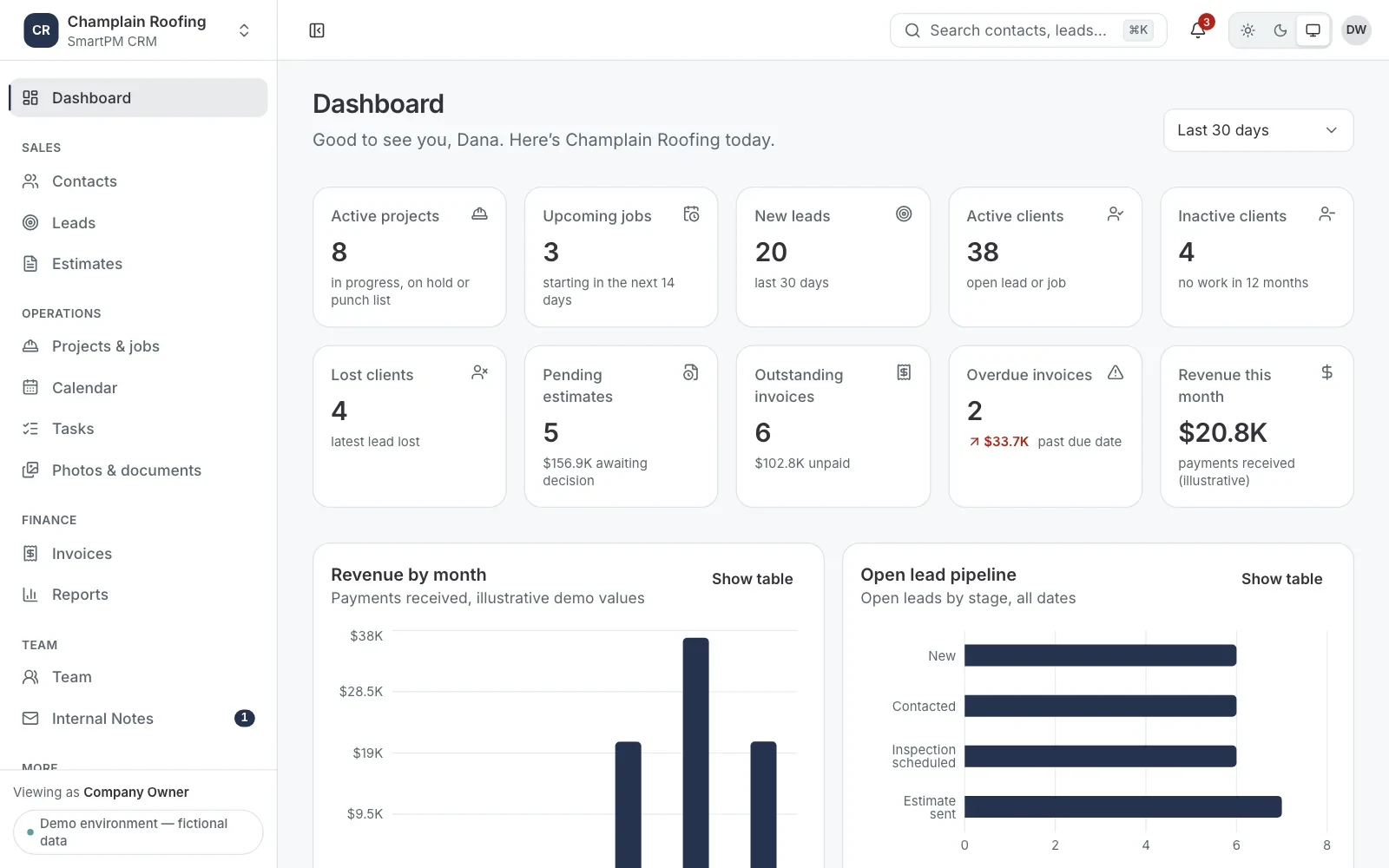
A roofing-industry CRM prototype that works on desktop, tablet and phone. It gives each roofing company its own workspace, with role-based dashboards, contacts and a lead pipeline, built on a shared design system.
Built for: Roofing contractors who manage leads, crews, estimates and invoices across the office and the field.
- Next.js
- React and TypeScript
- pnpm workspaces
- Tailwind CSS
- Radix UI
- Recharts
- dnd-kit
- Zod
- Zustand
- React Hook Form
- Vitest
- Playwright
The problem
Roofing work is split between the office and the roof. Office staff chase leads and paperwork, project managers juggle jobs, and crews need their schedule without the financials. A CRM for this trade has to serve all of them, and a platform serving several roofing companies must keep their data apart.
What we did
Discovery and technical specification · Shared design system with light and dark themes · Typed demo data layer with integrity checks
The outcome
The prototype is a working first phase that the product owner can click through as any role and in either company. Its remaining modules are already in the data and the plan.
Project overview
SmartPM is a CRM planned for roofing contractors: one product for leads, crews, photos, estimates and invoices. Blocvibe wrote its specification and built the first working phases as a front-end prototype that runs on fictional demo data.
Our contribution: Product specification, design system, data layer and the first CRM modules, built in Next.js, React and TypeScript, 2026.
Goals
- Give each roofing company its own workspace, branding and data
- Show each person only what their role needs
- Follow a job from first contact to a won project
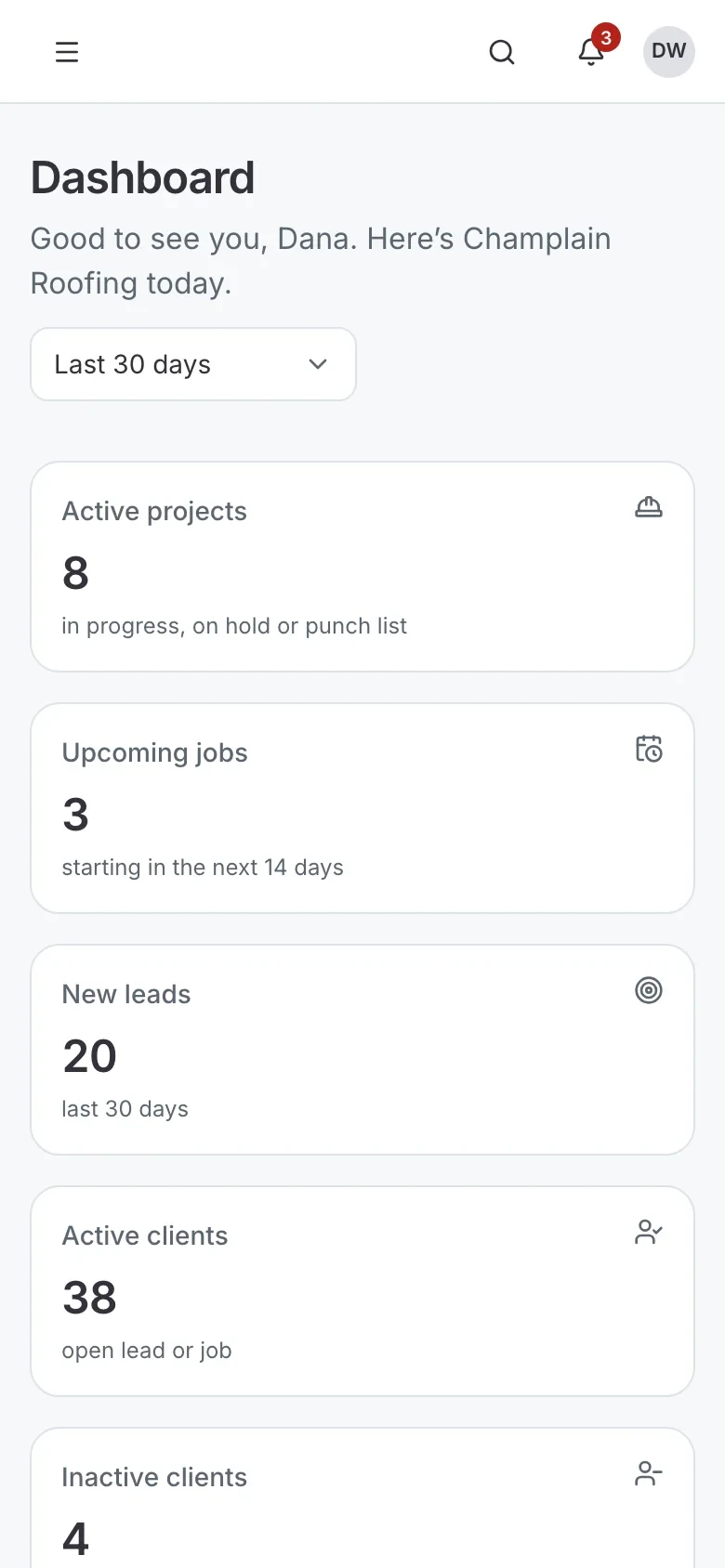
- Work as well on a phone in the field as on a desk in the office
Scope and deliverables
- Discovery and technical specification
- Shared design system with light and dark themes
- Typed demo data layer with integrity checks
- Role-based demo sign-in and company switching
- Dashboard, contacts and lead pipeline
The challenge
Roofing work is split between the office and the roof. Office staff chase leads and paperwork, project managers juggle jobs, and crews need their schedule without the financials. A CRM for this trade has to serve all of them, and a platform serving several roofing companies must keep their data apart.
- Different roles need different views of the same records
- One company's records must never appear in another's
- Crews work from phones, so every screen must work on a small display
- Leads move through clear stages, from new enquiry to inspection, estimate and won job
Our approach and strategy
Blocvibe started with a written specification covering modules, roles, data and phases, then built the product in phases, each ending with tests and a review. The prototype is a pnpm workspace of three Next.js apps sharing one design system and one data package.
- SpecifyA 29-page discovery and technical specification: modules, role permissions, data model, design tokens and a phased plan.
- Design systemAccessible components on Radix UI, styled with design tokens, shown in a working component gallery.
- Data layerZod schemas for every record, deterministic demo data for two companies, and money handled in whole cents.
- CRM sliceSign-in, company switching, the dashboard, contacts and leads, working end to end.
Design and user experience
The interface is calm and dense enough for daily office work, and each company's workspace takes on its own primary colour.
- A sidebar that becomes an icon rail on tablets and a drawer on phones
- Tables that turn into cards on small screens
- Light and dark themes that follow the device, with a manual switch
- Every chart has a legend and a table view, and focus returns to where it started when a dialog closes
Technology stack
Application
- Next.js
- The CRM, with foundations for a platform admin portal and a marketing site.
- React and TypeScript
- Every screen and shared component, in strict TypeScript.
- pnpm workspaces
- One repository, with shared packages for tokens, components and data.
Interface
- Tailwind CSS
- Styling through shared design tokens, with per-company colours.
- Radix UI
- Accessible dialogs, menus, selects and other primitives.
- Recharts
- Dashboard charts.
- dnd-kit
- The drag-and-drop lead board, by mouse, touch or keyboard.
Data and forms
- Zod
- Schemas that define every record and validate every change.
- Zustand
- One saved store per company, kept in the browser.
- React Hook Form
- Contact and lead forms with field-level validation.
Quality
- Vitest
- Unit tests for money, dates, permissions, data integrity and components.
- Playwright
- Browser tests in Chromium, WebKit and a phone viewport, with accessibility checks.
Challenges and solutions
Challenge
Keeping one company's data out of another's.
Solution
Every workspace address starts with its company, each company has its own saved store, and an integrity check rejects any record that points outside it.
Challenge
Showing each role the right screens.
Solution
A permission matrix covers 17 modules for six roles. Field crew, for example, see their work without the financial figures.
Challenge
Numbers that agree everywhere.
Solution
Every dashboard figure is calculated from the same records the lists show, and tests check that each tile matches the list it opens.
Challenge
Saved data that becomes unreadable.
Solution
Damaged, outdated or mismatched saved data is replaced with fresh demo data, and a notice says so.
Product showcase
01 / 12The same dashboard on a phone
End to end
How a Blocvibe project is delivered
The stages we use to run custom software projects. The detail of each one depends on the project.
What was delivered
The prototype is a working first phase that the product owner can click through as any role and in either company. Its remaining modules are already in the data and the plan.
- Role-based dashboard with charts and table views
- Contacts and leads that can be created, edited, moved, lost, reopened and converted
- Two company workspaces with complete separation and their own branding
- Desktop, tablet and phone layouts, in light and dark themes
- Unit and browser tests, including accessibility checks
Key takeaways
What it shows
- A written specification before code, with every assumption labelled for the owner to approve
- Multi-company separation designed into the data, not added later
- A design system that makes later modules faster to build
Related services
- CRM and ERP Development
CRM and ERP systems, or extensions, that follow your business rules.
- SaaS and MVP Development
A focused first version of your product, built to learn from real users.
- Web Application Development
Fast, accessible web apps and portals that work in any modern browser.
Have a Similar Project in Mind?
Let’s turn your idea into a powerful digital solution.